What Recording Equipment Is Available?

  • Thread starter Thread starter Wabatuckian
  • Start date Start date
"A two mic input mixer gets you 4 mic tracks...<snip>"

Are you saying the inputs are each stereo? I assumed each mic track was mono, and so I'd need four tracks for vocals, guitar, drums, and bass (if I can ever find anyone to play those for me!)
Right chap! First off, forget terms like "mono" and "stereo" which way the two channels are recorded is decided in the DAW, the software that does the recording. A 2 input interface will/can record two channels, guitar and voice if you will (you can of course CHOSE to record them as a stereo track)

But...IF you went for the next AI up, and there are many of them, it can have the same two mic channels but also two more line input channels which can record the output of, as I said, a small mixer*. That would give you four, discrete microphone inputs. Yes, you could buy a 4 mic input interface but they tend to be more expensive than the AI plus mixer combination and in any case, there are very few things as handy to the budding recording musician as a mixer! Mixers can of course be had with vastly more than 2 mic inputs but they all basically "mix" down to two tracks. Patently to feed two PA speakers for live work, headphones or indeed a 2 channel recording device.

*These are legion, makers such as Behringer, Alllen and Heath, Mackie, Soundcraft, Tascam and many more.
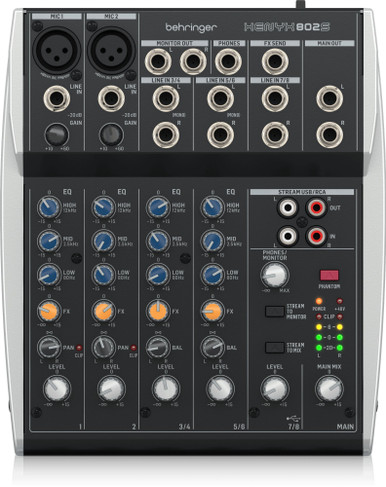
Just an example, many more.

Dave.
 
Ad at amazon says 'boom microphone stand with telescoping boom arm' for that $150 not the recorder.
 
Last edited:
$325 + $56 shipping + tax ($15-20). You're up to $400 for a used unit. Granted, I would agree the DP24 or a Livetrak L6 would be a much better option. An H5 or Portastudio X6 is a better option.


I think Waba is looking far too much to save a buck at the expense of usability. There are a half dozen H4nPro recorders listed on Ebay for $130 delivered. A brand new H4nEsss is $167 delivered. 32 bit recording, 4 channels with full multitrack recording and mics that you could use to start recording 5 minutes after you get it.

It doesn't get much cheaper than that for so much recording ability. Saving $15-20 shouldn't even be in the equation!
 
Interesting.

I saw that bundle, but it's not the link I shared -- at least, for me it isn't. I click the link and it takes me to the $150 recorder only.
Seems Amazon give you a different page depending on where you are.
 
This discussion got me thinking about... how simple and inexpensive could I go and still get decent quality. Like for recording my acoustic guitar. I remembered I have one of those little handheld Olympus LS-10 PCM recorders which records in "stereo". So a few minutes ago I stuck it on a tripod and set it in front of my Taylor 414ce. I have some really quiet spots in the house - but I decided to just set it up in my den - kids playing next door and a full blown patio construction project happening at my neighbors place across the street. These things are super sensitive so there was a lot of noise once I dumped this in Reaper. And my wife was talking loud in her office - but I don't think you can hear any of the background crap - just some hiss. (ignore the clams - it was a single take)

This is the recorder:

View attachment 153600

The first clip is 100% dry and unprocessed. The second one is possessed a little: EQ, compression, reverb
the dty one sounds very lively, I think the acoustic guitar sounds so much better with the dynamic. If you'd use less compression in the second one that is processed, I think It'd be better. I was also thinking about buying an audio recorder, but just to check if I actually would use it, I bought a very cheap one. It has it's own atmosphere to the recording, I haven't used it that much though, didn't have time, so still thinking about other model
 
They use a small buffer, so I suppose if the filling of the buffer is slower than the output that would stutter, but that's more like a solid state fault. Or maybe the clock being intermittent so the stream isn't contiguous?

For those interested, the issue ended up being the micro SD card. Dunno why; it was relatively new. I have several, so I popped a new one in and it works.
 
Zoom Cycling is not the same company as Zoom recorders. TOTALLY different.

I've got a Zoom H4n and a Zoom R24. They are older units, the H4N was bought in 2011, and the R-24 in 2013. Both still work flawlessly. The H4 essential is $220, has 4 track, internal + external mics, 32bit recording, multitracking and does 96K recording. The H5 Studio runs $350 but has more capabilities.

Tascam's DR40X is $260, similar to the H4Essential. 4 tracks, multitracking, 32bit/96K recording, internal and external mics.

These are all handheld and can act as an audio interface when connected to a computer. I use mine for mobile recording, pull the SDHC card from the unit and dump the audio directly to my computer for further processing or adding to video.

If you don't need portability and have a decent, current computer, you can buy an audio interface like a Motu M2 for $200, Tascam 102i for $150, or Focusrite 2i2 for $220.

More inputs costs you more money, but you won't need a mixer. Everything is done in the computer. You can get a 4 input Behringer 404Hd for under $150. A Behringer 1820 has 8 mic inputs for $230. Behringer doesn't have the greatest reputation but I think the stuff is serviceable. I have a Tascam 16x08 with 8 mic inputs, plus 8 line inputs. I can record 16 tracks at once on a computer that is 12 years old.

One last route would be something like the Tascam DP24SD or Tascam Model 12. Much like my R-24, you record everything to the unit and then you have the option of mixing in the unit or dumping to a computer. Those will run about $6-700 which might be out of your ballpark. But it's an option.

After about a month of research, I've ordered a NOS Zoom H4n. The price was right, and, though I wasn't after external mics specifically, I decided they'd be nice for recording with the acoustic guitar in the go.

I'd been looking at the H1 XLR, but it has 32 bit floating input, which, if I understand it correctly, automatically sets the levels. I'd rather do that myself, and the H4n allows that.

Thanks!
 
The H4n is probably the better choice. I don't think the H1 XLR has the ability to do multitracking, it's more designed to capture the audio live and be done. I would have gone for the H4Ess, to get the 32 bit recording.

The whole point of 32bit floating point audio is that at 1500+dB capability, the possible dynamic range is so large that you can't clip the signal. That means that you don't need to set the level to keep from distorting. You can always adjust levels in your DAW.

If you think about it, 16 bit is like a barrel of water. 24 bit is like a swimming pool. 32 bit floating point is like Lake Michigan.
 
The H4n is probably the better choice. I don't think the H1 XLR has the ability to do multitracking, it's more designed to capture the audio live and be done. I would have gone for the H4Ess, to get the 32 bit recording.

The whole point of 32bit floating point audio is that at 1500+dB capability, the possible dynamic range is so large that you can't clip the signal. That means that you don't need to set the level to keep from distorting. You can always adjust levels in your DAW.

If you think about it, 16 bit is like a barrel of water. 24 bit is like a swimming pool. 32 bit floating point is like Lake Michigan.
I am a bit confused about this glut of interfaces with 32 bit working? You must still keep input levels under the mic pre's clipping point? I have read of some VERY expensive AIs that use a two stage preamp system and some very clever switching to make the device just about un-overloadable but I don't think you are getting that technology at the price point of those Zooms?

But, "real world usage" is everything. If you are recording a band down the Mucky Duck with an audience and bar, the ambient noise level will rarely be lower than say 50dB SPL? If the band hits 100dB then a decent cassette recorder would suffice! 16 bits would be a massive overkill. Proper studios have noise floors better than 30dB.

Dave.
 
I haven't run into a situation where I actually distorted the preamp itself. I have had two situations where I set the level based on early levels, but after some playing, the level went up and it actually overloaded the digital converter.

This was the waveform from this overload. I did some testing and it's not from the preamp itself. I used the same setting at 16bits and 24 bits. The preamp was fine. But the converter apparently gets lost in the math. You would think that when presented with a voltage that would give "22 bits", but you only have 16 bits, it should just truncate to the 16th bit and give a flat top. Instead it seems to dump the first 16 and just write a 6. Then once the level drops back down, the wave returns to the correct value. In doing so, it makes a very audible glitch. When using the same setting with 24 bits, it just recorded the wave normally.

I found that if I drew in a curve from the top peak to the next peak, the glitch disappears and the audio was usable.

DigitalOverload.webp


BTW, this was on the Zoom R24. I haven't tried the same with my Tascam interface. Different converters might handle this differently.
 
I am a bit confused about this glut of interfaces with 32 bit working? You must still keep input levels under the mic pre's clipping point? I have read of some VERY expensive AIs that use a two stage preamp system and some very clever switching to make the device just about un-overloadable but I don't think you are getting that technology at the price point of those Zooms?

But, "real world usage" is everything. If you are recording a band down the Mucky Duck with an audience and bar, the ambient noise level will rarely be lower than say 50dB SPL? If the band hits 100dB then a decent cassette recorder would suffice! 16 bits would be a massive overkill. Proper studios have noise floors better than 30dB.

Dave.

For ME, floating or whatever would be too convenient right now.

I love car audio systems, and know clipping and wattage and distortion from that, and also that I grew up with an electrical engineer dad and I was always experimenting with electricity and electronics from probably age 10 on. (I still remember sitting there at my desk in my bedroom soldering something. I forget what I was soldering, but the iron fell and I caught it in my left hand to save my crotch. I had a perfect burn imprint of the iron, including the phillips head that held on the tip, on my palm for the longest time 🤣)

On the other hand, about half of what you guys talk about here, I have no idea what it means.

Clipping? Absolutely. 32-bit float? No idea what that means except I gather it'll auto level everything for me, or otherwise not make me have to manually adjust the levels.

If I just turn the thing on and start recording, I won't learn anything.

When I started driving, I had a stick shift first; in fact, my first couple Jeeps were manual transmissions. When I started shooting, my first rifle was a bolt action: I had to manually work the action to load the next round. My first multimeter was a swing needle, and my first digital multimeter didn't auto-range. Only a few years ago did I get my first auto-ranging DMM.

Point is, doing it manually first allowed me to learn the nuances behind whatever I was achieving, and that knowledge was invaluable later.

Honestly, with music, I wouldn't mind mixing using recording tape and a manual board just to learn, then go to the computer after learning all that. Problem is, I don't have the time nor the extra money to spend on all that.

I figure, therefore, a digital recorder that requires manual settings will at least allow me to learn some of this at the fundamental level I want.

On the other hand, I bought this from a person on eBay who's not shipped it yet, and who hasn't answered my messages asking for a tracking number. She also has no feedback yet. I was trying to give a new seller a chance, and it may have bitten me in the butt.

If I have to cancel the order tonight, all reassess and maybe go with an H1 XLR (https://link.amazon/B04k6qAfz), which is my second choice. I just need to make sure I can monitor through headphones wish with it.
 
OK, no response from the seller for the H4n, so I cancelled the order and placed one for a new H4e, which does have that 32-bit floating thingy. I figure the warranty and delivery time was worth the extra cost -- I want it to arrive tomorrow, on my birthday 😄

Screenshot_20261104-175033.Moto App Launcher.webp
 
There's no mystery or auto leveling involved in 32bit floating point audio. It's simple math. With 16bit audio the sample level can go from 0 to 65,536. With 24 bits, you can have over 16 million levels. Each level corresponds to a voltage of the audio signal. All levels are in the positive domain. Silence is 0, 100% is the top number.

With 32 bit floating point you are actually storing the number in 3 pieces. Unlike fixed point numbers, which are only positive, the wave is stored as both + and - values, much like analog voltages.

The bits are defined as follows:

– 1 sign bit: Indicates whether the sample’s amplitude is positive (+) or negative (-);
– 8 exponent bits: These bits represent the exponent, determining the scale of the floating-point number. Instead of relying on fixed steps, they shift the binary point, allowing it to “float” across a dynamic range that covers both tiny fractions and very large values.
– 23 mantissa bits: Store the actual precision of the sample value within the current scale.

So you have a number that is in essence, scientific notation. This means that you have a HUGE workspace to store the number. A properly designed system should run out of analog dynamic range (mic and preamp) before it runs out of it's digital numeric range. That just means you never have to worry about digital clipping.

1793827691786.webp


You should be fine as the H4n will handle 44.1 and 48kHz / 24 bit which will give you plenty of room to work. Just remember to watch the overload lights and turn things down it you see ANY red.

I still think the H1 XLR is the wrong tool for the job unless you're going to try to use it as an interface. It's like having a plain stereo cassette recorder, not a Portastudio. You'll likely outgrow it if you get into recording at any real level.
 
I must be getting senile in my old age. I wrote up that post about an hour and a half ago, and never pressed the "post reply" button!

The H4e should give you what you need. Take some time doing some recording and then you can start looking at microphones when you're ready to take the next step.
 
That H4e confuses me! The XLR inputs are marked "MIC/LINE 1&2". My son has the Tascam DR-40XP and that is more logical in calling the XLR inputs 3 and 4. I wonder how the Zoom's 4 tracks present themselves in a DAW? On the 32 bit float point? Most DAWs use it these days I think? Pro Tools being an exception? This means it is virtually impossible to clip in the digital domain but you are still limited in the output level in the same way that you can still overload an input.

Dave.
 
For those interested, the issue ended up being the micro SD card. Dunno why; it was relatively new. I have several, so I popped a new one in and it works.

Makes some sense, especially if it didn't come with the SD card.
There's a class system for maximum transfer speed, so you know if the card is suitable for use in particular devices,
high spec cameras, video, etc.

Screenshot 2026-11-05 at 10.08.17.webp
 
Most manufacturers publish a list of compatible SD cards.

I've had good luck using Sandisk cards, and some A-Data cards, but I buy cards that exceed the minimum required speed. The Sandisk Ultras will handle almost 20MB/Sec which works in both my HD camera and both of my Zoom recorders.
 
Makes some sense, especially if it didn't come with the SD card.
There's a class system for maximum transfer speed, so you know if the card is suitable for use in particular devices,
high spec cameras, video, etc.

View attachment 153763
Most manufacturers publish a list of compatible SD cards.

I've had good luck using Sandisk cards, and some A-Data cards, but I buy cards that exceed the minimum required speed. The Sandisk Ultras will handle almost 20MB/Sec which works in both my HD camera and both of my Zoom recorders.

I'm pretty sure it's the one that came with it, and it just started frying. Before I brought it in to record with, it spent a couple years in a bag on my mountain bike, and it was generic to begin with.

Its replacement is a SanDisk I had lying around.
 
Back
Top