What Recording Equipment Is Available?

  • Thread starter Thread starter Wabatuckian
  • Start date Start date
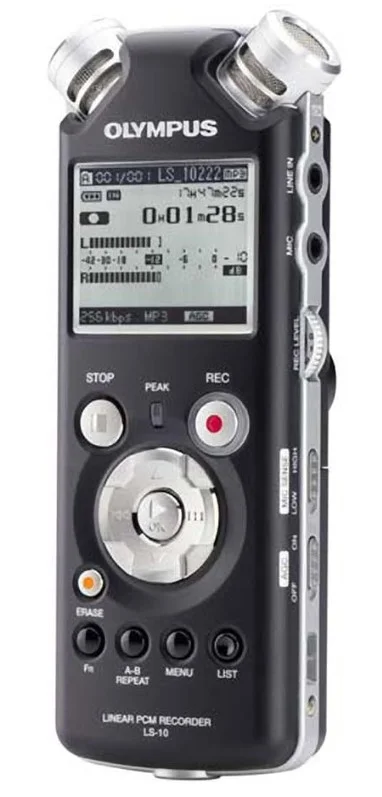
This discussion got me thinking about... how simple and inexpensive could I go and still get decent quality. Like for recording my acoustic guitar. I remembered I have one of those little handheld Olympus LS-10 PCM recorders which records in "stereo". So a few minutes ago I stuck it on a tripod and set it in front of my Taylor 414ce. I have some really quiet spots in the house - but I decided to just set it up in my den - kids playing next door and a full blown patio construction project happening at my neighbors place across the street. These things are super sensitive so there was a lot of noise once I dumped this in Reaper. And my wife was talking loud in her office - but I don't think you can hear any of the background crap - just some hiss. (ignore the clams - it was a single take)

This is the recorder:
Olympus LS-10.webp


The first clip is 100% dry and unprocessed. The second one is possessed a little: EQ, compression, reverb
 

Attachments

I was going to say I prefer the dry one, but right now I'm having some serious hearing loss issues. I'm afraid to make any judgement, as it's really playing havoc with my tonal balance, and even pitch perception.

I will say that what you can do today with such basic, simple equipment is amazing. The other night I was going thru some old transfers of tapes that my dad made of my sister playing piano. He had a Wilcox-Gay Recordio (1955 mono) and the mic was a salt crystal microphone. I checked the mic out, it was dead. When opened, you could see the salt that had dissolved of the past 70 years.

That recorder cost him more than an H1Essential today!!! At 130, that would be roughly $1600 today with inflation. Plus you had to buy tape to run it. A 7" reel of Scotch 190 tape was $7.70. That's one reason I try to make people understand the absolute bargain basement cost that digital recording offers today for REALLY HIGH quality.

This is home recording in the 1950s!


1792191011919.webp
 
Last edited:
Sorry to hear about your hearing issues sir. That's a drag considering this is a hobby of yours. Best wishes with that.

But yeah - there's something to be said for a minimalist approach and getting the most out of very little.
 
I was going to say I prefer the dry one, but right now I'm having some serious hearing loss issues. I'm afraid to make any judgement, as it's really playing havoc with my tonal balance, and even pitch perception.

I will say that what you can do today with such basic, simple equipment is amazing. The other night I was going thru some old transfers of tapes that my dad made of my sister playing piano. He had a Wilcox-Gay Recordio (1955 mono) and the mic was a salt crystal microphone. I checked the mic out, it was dead. When opened, you could see the salt that had dissolved of the past 70 years.

That recorder cost him more than an H1Essential today!!! At 130, that would be roughly $1600 today with inflation. Plus you had to buy tape to run it. A 7" reel of Scotch 190 tape was $7.70. That's one reason I try to make people understand the absolute bargain basement cost that digital recording offers today for REALLY HIGH quality.

This is home recording in the 1950s!

View attachment 153604

View attachment 153603

What's a "dry tone"?

I'm -45dB at 4kHz in my right ear according to a hearing test I had at school when I was subbing in 2023, and there's also tinnitus. It makes learning to mix even more challenging; I have to listen to whatever changes I make and then turn 180⁰ and listen to them again 🙄
 
Dry just means "as recorded". No EQ, compression, reverb or effects. Set it up, hit record, play music, press stop. Don't tweak things to make them sound "better".
 
Dave, yes — MT Power Drum Kit 2 works in REAPER; the maker lists REAPER as a tested host. Cubase isn't required.

For a first test:
1. Get the version for your operating system from powerdrumkit.com. On Windows, the current VST3 instructions say to keep both MT-PowerDrumKit.vst3 and MT-PowerDrumKit-Content.pdk together in the appropriate VST3 folder.
2. In REAPER, choose Insert > Virtual instrument on new track, search for MT-PowerDrumKit and select it. You can decline the extra-output routing initially and use one stereo drum track.
3. Open the plugin's Grooves section and drag a groove into that same track. Set REAPER's project tempo, then play the MIDI item. The MIDI triggers the drum sounds inside the plugin; it isn't an audio recording by itself.

The maker has OS- and REAPER-specific installation/troubleshooting here: https://www.powerdrumkit.com/help.php

If it doesn't appear in the instrument list, tell us Windows or Mac and whether REAPER is 32- or 64-bit; that narrows the installation step down without changing anything else in your setup.
 
Rich, Neither I nor son have Cubase. We do have Reaper, will that work and if so can anyone tell me how to do it please?

Dave.
I only use Reaper. I've been on it since version 4.3 in 2012! Didn't even realize it has been on my computer that long, but I still have the first download on a backup hard drive.

I have an old version of Cubase LE1.0 on an OLD laptop, and a CD of LE5 somewhere I've never installed.

MTPDK has an installer that just makes a VST3 plugin. https://www.powerdrumkit.com/download76187.php

Pick Windows, VST, then the VST3 and 64 bit and download the file. This is the direct link.


There are instructions on the download page. Once you are installed, rescan the VST locations in Reaper to make sure the Manda Audio files are found. Then it's simple Plug In stuff. Start the Plugin. If you send the $5 or 10, they give you a registration number which skips the nag screen. Hit SKIP until then. From there, you can choose the Grooves,, then just drag and drop grooves into the track. You can listen to the grooves by pressing the little play icon.

In Reaper, if you have a groove and double click on the track section, it will open a midi editor where you can remove dots, add dots etc. It gets easy very quickly. The only real limitation is that it only has one set of drum samples, but I have played around with sending the track info to my SR18. It requires some mapping but that would give me all the Alesis drum kits with MTPDK's programming power.

I guess the next step would be something like EZ Drummer or Superior Drummer which are much more $$$.

MTPDK1.webp
MTPDK Add Grooves.webp
 
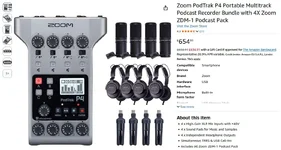
What about this thing?


It says it was developed specifically for podcasts, but it's a 4-track recorder (video says it can record 10 tracks) with the ability to add in sound effects etc should I ever need that ability off-computer.

It doesn't have built-in mics, and that's ok since I plan to use external mics.

Is there anything that would make it less desirable for music vs voice?

Thanks!
 
That link appears to be the original Zoom PodTrak P4. It can capture music, but I would separate two jobs before buying: recording a live performance with several microphones, and building a song by recording guitar first and adding vocals later.

Zoom’s manual specifies four XLR mic inputs and 44.1 kHz/16-bit recording. The higher track count includes stereo phone/USB sources, sound-pad audio and the stereo mix; it does not mean ten microphone inputs. Over USB it is a 2-in/2-out interface, so you do not get four separate mic channels straight into your DAW that way. Separate recordings on the SD card can be transferred for mixing.

The practical question for your off-computer plan is overdubbing: ask for a demonstration of playing an existing guitar take while recording a new vocal take, with both kept separate. A “multitrack” label alone does not establish that workflow. Also distinguish the original P4 from the newer P4next when reading specs.

Official P4 manual: https://zoomcorp.com/media/documents/E_P4_v2.pdf

Would you normally record guitar and voice together, or one after the other?
 
That seems expensive for what it is.
I say have a good look around at other options.
It does indeed! The usual route to input expansion is to buy an interface with 2 or 4 mic channels but also equipped with ADAT which allows the connection of an ADAT pre amp giving 8 more inputs in the future should you wish to go that route. The starting point price wise would be the Behringer 1820 and later their ADA8200...There are better AIs and ADAT pres!

If you want and can "push the boat out" look at Sound Devices 10 Pre!

Dave.
 
"Quality", it's not a problem, but it's the wrong tool for the job you're wanting to do. You want to record music, and should have the ability to multitrack. The P4 is limited in file format and capability. It's designed to record a bunch of folks chatting at one time. It can be an interface, but only 2 channel.

The H4ess, H5, H6, Tascam X6, X8 are the better choices. If you can't afford new, look for a used unit. There are many out there. It's not like a 50 yr old tape deck where there are lots of moving parts!

You can pound a nail with a pipe wrench, but it's the wrong tool for the job!
 
That link appears to be the original Zoom PodTrak P4. It can capture music, but I would separate two jobs before buying: recording a live performance with several microphones, and building a song by recording guitar first and adding vocals later.

Zoom’s manual specifies four XLR mic inputs and 44.1 kHz/16-bit recording. The higher track count includes stereo phone/USB sources, sound-pad audio and the stereo mix; it does not mean ten microphone inputs. Over USB it is a 2-in/2-out interface, so you do not get four separate mic channels straight into your DAW that way. Separate recordings on the SD card can be transferred for mixing.

The practical question for your off-computer plan is overdubbing: ask for a demonstration of playing an existing guitar take while recording a new vocal take, with both kept separate. A “multitrack” label alone does not establish that workflow. Also distinguish the original P4 from the newer P4next when reading specs.

Official P4 manual: https://zoomcorp.com/media/documents/E_P4_v2.pdf

Would you normally record guitar and voice together, or one after the other?

I record voice and guitar together, otherwise I have trouble because I tend to improvise and not really play the same twice in a row.
 
I record voice and guitar together, otherwise I have trouble because I tend to improvise and not really play the same twice in a row.
Forgive me for not wading back through the thread but if you record guitar and voice together, why do you need 4 tracks? Spend what you can on a good 2 in 2 out interface. I can strongly recommend the MOTU M2. My son and I both have the M4. Same interface except the 4 has two extra line inputs and two more line outs. You would be future proofed with the M4 as you could run a small mixer into lines 3/4. A 2 mic input mixer gets you 4 mic tracks and a bigger mixer would allow the mix down to 2 channels of more instrument or say a drum kit.
My son runs an Allen and Heath ZED10 into his M4.

Dave.
 
Forgive me for not wading back through the thread but if you record guitar and voice together, why do you need 4 tracks? Spend what you can on a good 2 in 2 out interface. I can strongly recommend the MOTU M2. My son and I both have the M4. Same interface except the 4 has two extra line inputs and two more line outs. You would be future proofed with the M4 as you could run a small mixer into lines 3/4. A 2 mic input mixer gets you 4 mic tracks and a bigger mixer would allow the mix down to 2 channels of more instrument or say a drum kit.
My son runs an Allen and Heath ZED10 into his M4.

Dave.

"A two mic input mixer gets you 4 mic tracks...<snip>"

Are you saying the inputs are each stereo? I assumed each mic track was mono, and so I'd need four tracks for vocals, guitar, drums, and bass (if I can ever find anyone to play those for me!)
 
Seems so, Wabatuckian.
It is a bundle with mics, headsets, and mic stands.
Zoom.webp
 
Back
Top