
Tascam 388 Fader/VU/Actual Output differences

  • Thread starter Thread starter frcake
  • Start date Start date
F

frcake

New member
Hello everyone!

I am an owner of a Tascam 388 which has been somewhat serviced a long time ago but there are still some problems.

Now the problem I'm going to describe happens on *all* channels in regards to Left/Right balance.

Setup:
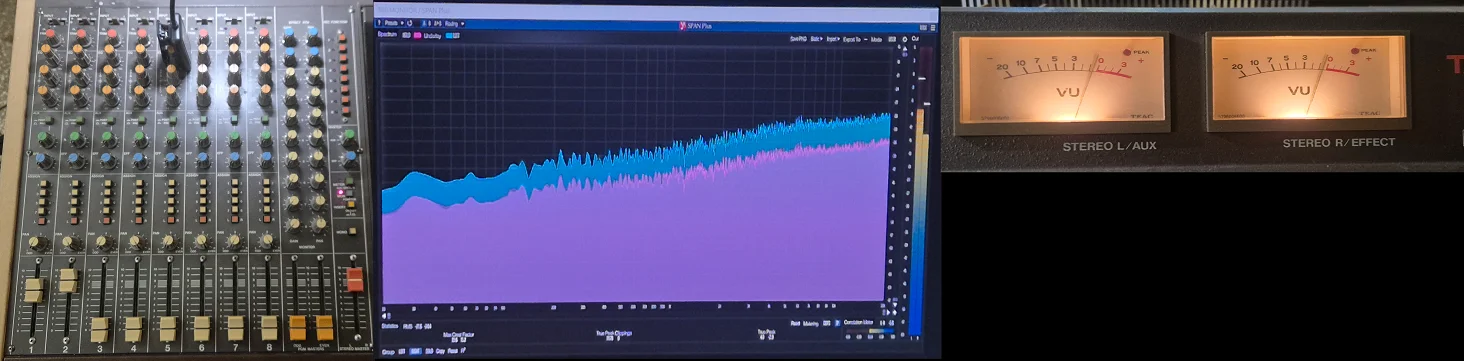
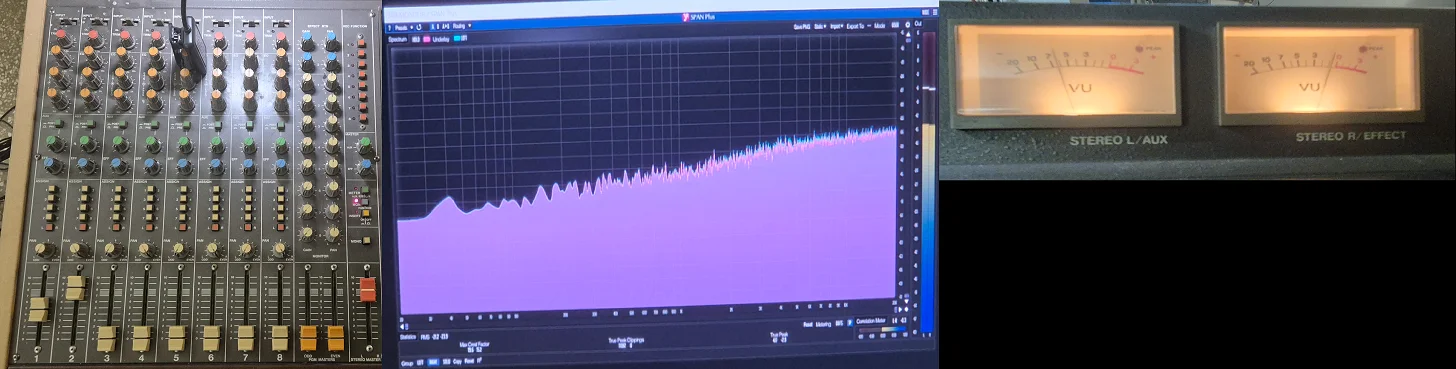
I'm sending a static noise from my soundcard to 1-2 input, connect the tascam 388 output back to the computer to the spectrum analyzer which is in dual-mono setup L/R.

Example 1: Bad fader alignment, VU Meter shows equal gain, Difference in actual output levels:
1781455077590.webp


Example 2: Bad fader alignment, Bad VU L/R reading, Equal actual output levels:
1781455064797.webp


Any ideas about this? I've opened the top panel but I don't seem to find anything regarding the line trim, I'm not even sure if it's the line trim to be honest, maybe a combination of line trim & VU calibration? Or something totally different?

Again, this happens on all channels, so all channels must have this weird fader positioning to have an equally stron L/R output.

I have the 388 manual, so if I have to open the machine, you guys could help me do it correctly or point me to the manual..

Thank you!
 
Clearly, your VU-Meters are not calibrated correctly, so the differences you have. See the section 1-12 (page 61) of the service manual, it's not complicated to calibrate.
 
Clearly, your VU-Meters are not calibrated correctly, so the differences you have. See the section 1-12 (page 61) of the service manual, it's not complicated to calibrate.
Hmm I think it's more of a master channel problem.
If I have a mono signal (just turn the panpot in the middle) the imbalance is the same. The only way to balance a mono signal is to turn the panpot exactly (in my case) at 3 o clock. This is the only way to have a true mono output from one single channel.

These are my panpots if I want any channel to send an equal L/R signal back to the card, so it seems like all the channels need exactly the same amount of panning..
1781464546730.webp
 
To confirm, see the signal for each channel at the PGM outputs to see if the imbalance is present or not.
 
To confirm, see the signal for each channel at the PGM outputs to see if the imbalance is present or not.

Let's say I have a 400 Hz signal going into all my channels from the card.

And I want e.g. Tascam mixer channel 2 to to go back to the computer. If the panpot is in the middle VU of channels 1&2 both show -3 db or, the same reading anyways..
The computer input reads a differenge of around 6 db. So I have to turn the panpot right so the new readings of each PGM VU reads L -8~ R -1~ .. so roughly those 6~ dbs of difference I saw before in the daw/card input.

PGM Masters are all the way up to be sure they are the same.

But I think the machine has a serious problem. I switched the BAL/UNBAL output in the back and the UNBAL out kills one output channel completely.. might be related might not I don't know..

I thought maybe there was a way to calibrate the master out or something but.. maybe I'm cooked :/
 
Adding to the tests:

I checked the signal from SEND. All channels show about the same signal strength (nowhere near the consistent difference needed to balance out the master)

Sent all channels to EFFECT/AUX post fader, Channel 3 doesn't get through to the sends, sadly.. but I can get a pretty ok L/R with master AUX & EFFECT at roughly the same level...

Sends are all cranked up to ensure same signal strength..
 
Last edited:
Reading again your first message, I still think you have mis-calibrated VU meters. See the Block Diagram (pages 47/48 of the service manual), the L/R VU Meters are after the Stereo Faders and just before the physical output. If they show the same volume but you have different results at the output, your VU Meters are clearly mis-calibrated.
I'm not sure to understand your other manipulations (compensate with pan potentiometer) and especially when you said "All channels show about the same signal strength", are you using the 388's VU-Meters to evaluate the signal level? Because if yes and if they are not calibrated, you can't be sure. After that, maybe there is an issue elsewhere but first thing is to calibrate your VU-Meters to evaluate properly your signal level.
 
Reading again your first message, I still think you have mis-calibrated VU meters. See the Block Diagram (pages 47/48 of the service manual), the L/R VU Meters are after the Stereo Faders and just before the physical output. If they show the same volume but you have different results at the output, your VU Meters are clearly mis-calibrated.
I'm not sure to understand your other manipulations (compensate with pan potentiometer) and especially when you said "All channels show about the same signal strength", are you using the 388's VU-Meters to evaluate the signal level? Because if yes and if they are not calibrated, you can't be sure. After that, maybe there is an issue elsewhere but first thing is to calibrate your VU-Meters to evaluate properly your signal level.
What I mean by compensate with panpot is the following. Imagine I send a signal only to channel 1 and nothing else. A mono signal. If I add the channel to the mix and leave the panpot untouched, there is a difference betweren L/R output signal strength. If I turn the pot towards the right channel (so more of R is mixed to the final Master signal) then I can balance it.

So forget about anything else, just think about 1 single channel, 1 input to master. Shouldn't that produce an equal L/R signal with the panpot in the middle?

I hope I'm explaining it well enough, thank you so much for trying to help!
 
If you take a mono input signal and sending one L/R main buss and leave the pan pot centered, the signal measured at the STEREO OUT jacks should be very close. It won’t be the same because the fader is a ganged two channel unit, short-throw and more budget quality/low-profile. So take your computer out of the mix and just measure with your DMM at the STEREO OUT jacks…set your DMM to AC volts and measure the L out and then the R out…400Hz is good because I don’t know if you have a DMM rated for audio. If it’s not, most are rated for accuracy up to 1kHz, and anyway we’re really just looking for the relative measurement between the two channels anyway. So measure with a meter at the STEREO OUT jacks and report back. If meter calibration is needed that’s all in the service manual. You access the trimmers for the PGM and main meters by removing the left “cheek” and there’s a passage in the chassis to access the trimmers, which are located along the left edge of the meter amp PCB, which is located at the left side of the cardbay. Hopefully that all makes sense and if it doesn’t please ask questions.
 
Thanks Sir Sweetbeats. Sounds on point.

I was going to say something simple. Like “you really should be checking your output voltages instead of using your computer.”

However, not being familiar with with the 388, I figured it would be best just to keep my mouth shut. There are those that have more knowledge and expertise than myself :LOL:
 
If you take a mono input signal and sending one L/R main buss and leave the pan pot centered, the signal measured at the STEREO OUT jacks should be very close. It won’t be the same because the fader is a ganged two channel unit, short-throw and more budget quality/low-profile. So take your computer out of the mix and just measure with your DMM at the STEREO OUT jacks…set your DMM to AC volts and measure the L out and then the R out…400Hz is good because I don’t know if you have a DMM rated for audio. If it’s not, most are rated for accuracy up to 1kHz, and anyway we’re really just looking for the relative measurement between the two channels anyway. So measure with a meter at the STEREO OUT jacks and report back. If meter calibration is needed that’s all in the service manual. You access the trimmers for the PGM and main meters by removing the left “cheek” and there’s a passage in the chassis to access the trimmers, which are located along the left edge of the meter amp PCB, which is located at the left side of the cardbay. Hopefully that all makes sense and if it doesn’t please ask questions.
hmm turns out after a lot of fiddling around, measuring things, losing my mind a couple of times.. it was a scratchy potentiometer that was causing this.
My pots are insanely scratchy I had to move all pots forcefully left/right which produces a lot of distortion until it stops (like any other scratchy pot I guess..)

Today I opened the machine and the right master channel was not working at all, but when I pressed mono, the channels had equal output..

I do have to resolve this EQ pot issue, which affected the channel even with the +/-db pots in their middle/default position..

They have to be deeply cleaned somehow.. or changed I guess? Can someone find those potentiometers on the market today?

I will be doing some work on the machine the following days, I just bought the calibration tape so I will try as much as I can..
 
Yes, of course pressing MONO will provide for equal level in both channels…it’s taking the one working side and centering it. Does it make any difference to gently press down on the right fader knob?

You want to get some DeoxIT F5 faderlube and remove the channel cards and jet the product in through a hole in the pot body, exercise it (rapid sweeping hard L to hard R multiple times…like, a bunch…wrapping a shoestring around the pot shaft with the knob removed and pulling that back and forth can make the wscercising more effective because it’s faster…) and then jet some more in there and then position the cars so the pots can drain and dry out overnight…then exercise more. The other thing that really contributes to the skritchies is caps in the signal path that are aged and out-of-spec. So sometimes a recap helps. The skritchies are essentially DC voltage artifacts. Audio signal is AC. Caps block the DC offset voltage that is naturally occurring at the output of each opamp in the signal path. When the fallout-of-spec they don’t do this as well.
 
Yes, of course pressing MONO will provide for equal level in both channels…it’s taking the one working side and centering it. Does it make any difference to gently press down on the right fader knob?

You want to get some DeoxIT F5 faderlube and remove the channel cards and jet the product in through a hole in the pot body, exercise it (rapid sweeping hard L to hard R multiple times…like, a bunch…wrapping a shoestring around the pot shaft with the knob removed and pulling that back and forth can make the wscercising more effective because it’s faster…) and then jet some more in there and then position the cars so the pots can drain and dry out overnight…then exercise more. The other thing that really contributes to the skritchies is caps in the signal path that are aged and out-of-spec. So sometimes a recap helps. The skritchies are essentially DC voltage artifacts. Audio signal is AC. Caps block the DC offset voltage that is naturally occurring at the output of each opamp in the signal path. When the fallout-of-spec they don’t do this as well.
After I dealt with the "skritchies" by violently moving the pots, the right channel became functional again; it seems that the EQ pot problem was cutting the sound going to the right channel.

Caps block the DC offset voltage that is naturally occurring at the output of each opamp in the signal path. When the fallout-of-spec they don’t do this as well.
^^ sounds like what's going on in my case..

You want to get some DeoxIT F5 faderlube
Sadly, being located in Greece, I don't have easy access to DeoxIT F5; I only found Teslanol t6 as an alternative, which has some lubricant, waiting for it to arrive as well. If you think it's not fit, I will have to search more for specifically DeoxIT F5.

I was able to record a .316 VAC 1KHz sine to the tape just to get the machine to an acceptable repro-calibration state while I'm waiting for the calibration tape to arrive. One thing I noticed while reproducing the recorder 1KHz was a low in volume noise, not just tape hiss, it had some elements in it with the instability of the vinyl noise of some sort, not exactly crackles or pops but some noise was there. I will record some later today or tomorrow and share it here so we can assess. Although there is some isopropyl and cotton swabs on the way for head cleaning.

I also recorded some music on it, and it sounded very nice, a bit of distortion maybe, but very nice. I guess the correct calibration tape will help it even more. So no dull highs, no dropouts/wows or anything. Sound had beefy bass and a generous forward-sounding bump at around 200Hz~. I will share this as well.

Sadly, I'm not qualified enough to do the recap, so maybe I will have to send it to a technician (which in Greece is a very tough subject), because I like my machines to be in top shape. I hope I'll be able to do the cleaning process (and thanks for the nice trick with the shoe lace!).
 
What kind of demagnetizing tool do you have?
No demagnetizers in the studio yet, but I'm sure I can borrow from my technician or buy one (I don't know which model he has, though). Do you have any particular in mind that's more fit for a 388?


remove the channel cards and jet the product in through a hole in the pot body

Can you point me to where I should look in the manual to see how to reach those cards/pots? The steps needed to open up the machine?
 
No demagnetizers in the studio yet, but I'm sure I can borrow from my technician or buy one (I don't know which model he has, though). Do you have any particular in mind that's more fit for a 388

Annie Han-D-Mag, Teac E-3 or similar. Don’t waste your money on the cheap ones…they are barely capable of degaussing a cassette transport.

I bring it up because I’ve experienced static-ey sounds on recordings when the heads really need degaussed, so it’s something you might try.

Can you point me to where I should look in the manual to see how to reach those cards/pots? The steps needed to open up the machine?

You’re not going to find anything in the manual for that. First off the 388 manual is pretty bad as far as disassembly instructions. It assumes you are a tech and do all of that or figure it out from the exploded views…which isn’t unfair. But this is basic old analog mixer stuff. You have to remove the bottom panel, remove the knobs from the channel you want to service, *carefully* remove the BUSS PCB that spans across the bottom of all the mixing section PCBs, unscrew the channel’s fader, unplug any other connections, remove all the pot nuts for the channel on the top panel, and you should be able to remove the PCB from the chassis, or at least get it out enough to service the pots. And at that point just look at the pots. There are a couple different passages or holes in the pot body into which you can inject the cleaning agent. And I really recommend DeoxIT F5. It cleans and protects and lubricates carbon element potentiometers without stripping the shaft lubricant. Be extra careful removing the BUSS PCB…go a little at a time. This is notorious for developing cracked solder joints during removal/installation.
 
You’re not going to find anything in the manual for that. First off the 388 manual is pretty bad as far as disassembly instructions. It assumes you are a tech and do all of that or figure it out from the exploded views…which isn’t unfair. But this is basic old analog mixer stuff. You have to remove the bottom panel, remove the knobs from the channel you want to service, *carefully* remove the BUSS PCB that spans across the bottom of all the mixing section PCBs, unscrew the channel’s fader, unplug any other connections, remove all the pot nuts for the channel on the top panel, and you should be able to remove the PCB from the chassis, or at least get it out enough to service the pots. And at that point just look at the pots. There are a couple different passages or holes in the pot body into which you can inject the cleaning agent. And I really recommend DeoxIT F5. It cleans and protects and lubricates carbon element potentiometers without stripping the shaft lubricant. Be extra careful removing the BUSS PCB…go a little at a time. This is notorious for developing cracked solder joints during removal/installation.
Thank you so much for all this valuable information!

I did some tests today, all that before opening/disassembly the machine and whatnot. Some interesting findings.

What I did was to feed a 1KHz .316VAC to the insert return of channel 1. Assign it to all channels and record.
Then repro each channel and record the outcome.

Then I recorded a full track using the machine, left everything at the middle, all faders/PGM at the grey area, assign channels and record. I have also included the DAW output of the track. Both tracks normalized.

Finally I recorded some silence from channel 1 to all channels with DBX on and DBX off.

I will upload all my tests in a zip. Although for some context let's take a look at some pictures (I will include all of them inside the zip folder)

This is the reproduction of the .316VAC (still waiting for the official calibration tape..) As you can see many weird things going on, some channels have side information, others have distortion at exactly 2khz + 3khz and all of them have this (although super low in volume) distortion near 20KHz.. Especially the side information and distortion make me scratch my head..

PS: not sure I can upload the zip here, but you can download it from my GDrive folder here:


repro-tk1.webp

repro-tk2.webp

repro-tk3.webp
repro-tk4.webp
repro-tk8.webp
 
Last edited:
This is all very into the weeds in my opinion. The 388 can’t even record or reproduce at 20kHz with any appreciable reliability. It’s not designed to do that. So I wouldn’t get twisted up about any of the above…little peaks in distortion, etc. you have a 40 year-old narrow format tape machine, so expect weirdness. Especially if it hasn’t been completely gone through and fully calibrated, serviced and adjusted.
 
This is all very into the weeds in my opinion. The 388 can’t even record or reproduce at 20kHz with any appreciable reliability. It’s not designed to do that. So I wouldn’t get twisted up about any of the above…little peaks in distortion, etc. you have a 40 year-old narrow format tape machine, so expect weirdness. Especially if it hasn’t been completely gone through and fully calibrated, serviced and adjusted.
Yea.. I totally agree, the full mix example made me scratch my head a bit, do you think it sounds "388-normal"?

I will call a tech tomorrow and see whether they can work with it :/
 
I didn’t listen to the sound samples. I haven’t had a 388 for a decade or more and haven’t done anything substantial with one for many years before that…and didn’t do a lot. So “388 normal” is not something I can answer or maybe even anybody. The question is does it calibrate to spec? And you don’t know that yet. If you can get it to perform in-spec according to the procedures in the service manual, you don’t go looking for problems beyond that. It’s a tape machine so there are going to be all sorts of anomalies. And it’s a 40 year old tape machine so there will be many more weirdnesses with it, mechanically, electronically, sonically…but the gold standard for “is it okay” is will it cal to spec…frequency response, levels, noise, track-to-track consistency…all that. If it records and plays back on all 8 tracks you’re already well on your way. That’s not the case a lot of the the time. And bear in mind edge tracks on a narrow format machine are always going to have more issues.
 
Back
Top