beginner here , having an issue with focusrite solo , working great in phone but bad on desktop pc

  • Thread starter Thread starter eihab
  • Start date Start date
eihab

eihab

New member
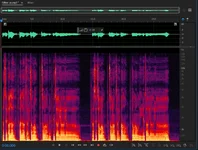
Hey everyone,this is gonna be long, but please help me ,I'm having this issue with my Focusrite Scarlett Solo 3rd Gen + Audio-Technica AT2020 setup. I've tried everything I can think of (and Focusrite support couldn't help either), so I'm hoping someone here has seen this exact problem.The Core ProblemRecordings on my PC (FL Studio) sound noisy, distorted-ish, distant/muffled, with poor dynamics. The voice feels "off" and not present/forward. Waveforms look flat-ish with a raised noise floor drowning details.

But when I plug the exact same Scarlett Solo + AT2020 into my phone (using BandLab or similar app), everything is crystal clear: super present voice, no extra noise, perfect clarity, no distortion, and proper dynamics—like night and day.

I even bought a second Scarlett Solo thinking the first one was faulty. Same issue on PC. Swapped USB cables, XLR cables, disabled all Windows sound enhancements, tried multiple USB ports—nothing helps on

PC.Hardware & Setup Details

Mic: Audio-Technica AT2020 (condenser, needs decent gain)

Interface: Focusrite Scarlett Solo 3rd Gen (bus-powered via USB)

PC: Desktop with ASUS Prime B450M-K II motherboard + Ryzen 3 4300G CPU

DAW: FL Studio

Windows 10

Specific Symptoms on PC

Need to crank the gain knob to around 2 o'clock (or higher) to get decent levels in FL Studio peaks around -18 to -12 dBFS

Even at low gain, the recording has excessive hiss/noise that isn't audible in the room—it's electrical.

Sound is "distorty ish" (gritty/buzzy/harsh, not hard digital clipping).

Waveforms look off: raised noise floor in quiet parts (thick/fuzzy baseline), dynamics feel compressed/flat because noise masks subtle details.

Key smoking gun: When I arm a track, turn on input monitoring or record silence (mic on, no speaking, no movement, room dead quiet), my EQ analyzer in FL shows a clear bump/peak in the low frequencies around 50-60 Hz (and possibly harmonics) nothing on the phone side (silent recording is dead clean, no low-end bump at all).

What I've Already Tried (Ruled Out)

Matched sample rates everywhere (Windows, Focusrite driver, FL Studio—e.g., all 44.1kHz or 48kHz).

Using Focusrite USB ASIO driver in FL.

Disabled Windows audio enhancements, exclusive mode issues, spatial sound, etc.

Reinstalled Focusrite drivers multiple times (clean uninstall via Device Manager).

Increased buffer size in FL (512–1024 samples).

Disabled other audio devices in Windows.

Different rear USB ports on motherboard.

Disabled USB selective suspend in Power Options.

Tested in other software e.g., Audacity/Reaper

—any help or similar stories would be huge. I'm at the point where I'm considering ditching the Scarlett ! Thanks in advance.
 
If running as a Windows device, you will need to make sure you have that selected and turn up the Windows volume to ~75%. Then use the volume knob on the device to control final sound.
 
If running as a Windows device, you will need to make sure you have that selected and turn up the Windows volume to ~75%. Then use the volume knob on the device to control final sound.
i turned it to 80 percent still same problem theres also an electrical like noise
 
First off, the AT2020 should not "need decent gain" It might be a cheapish Chinese mic but the specification of -37dB ref 1V/Pa means it is about 20dB more sensitive than an SM57 and I would expect a Gen 3 Focusrite AI, even the boggiest standard one, to be usable with the Shure dynamic.

Next, Windows gain controls should have NO effect on the mic level in your DAW IF you have installed and are using Frites ASIO drivers properly. And lastly, when you use the laptop, how are you hearing things?

Dave.
 
Is the phantom power enabled for the mic?
What about the pre-amp knob? I would set it a bit back from clipping. You'll get a strong signal out of it.
USB cable is neither here nor there.
 
Not, I am sure a factor here but I shall repeat a point I have stated several times on this forum for the benefit of the newcomers to computer recording and interfaces.
Do not cheap out on an AI with a single microphone input unless you have a very good idea that you will never want to record in stereo!
Even the nudge up from the basic solo guitar recording benefits from two mics on the instrument.

Dave.
 
Try using the FL Studio’s diagnostic tool -
Windows - Open FL Studio > Help (menu) > Diagnostics.
Try Reseting FL Studio I have a Scarlett 2i2 and have used it without issue.
 
Can we hear a clip of the problem? It's very hard to guess from text - but maybe 10-20 secs of audio would make it quite obvious.
If we are guessing, I too would be looking at driver problems - as in instead of using the focusrite one, you are using some kind of generic driver - but that wouldn't produce some of the things you are reporting. You say you've installed, removed and reinstalled the drivers - but is FL studio actually able to use them?
The other thing could be some odd routing you might have set up, where only a dribble of signal is getting to the destination so you're making it up with extra gain and processes? The 2020 as has been said is a high output mic. If you set levels through the interface to your phone and it sounds good - removing the phone connection and swapping to the PC should not require any changes in the preamp gain - just making FL Studio find the preamp output.
 
Re Rob's point about FL not using the ASIO driver? This can be quite tricky to setup in some DAWs. I have used FL but not for years, might still have it on a PC somewhere and if so I shall investigate.

IMHO it should be a Sticky that noobs install Reaper! Even if they don't like it and don't carry on with it...almost all of us here know how to get the basics working.
And yes, a clip and for me attach a 320k MP3
Dave.
 
Can we hear a clip of the problem? It's very hard to guess from text - but maybe 10-20 secs of audio would make it quite obvious.
If we are guessing, I too would be looking at driver problems - as in instead of using the focusrite one, you are using some kind of generic driver - but that wouldn't produce some of the things you are reporting. You say you've installed, removed and reinstalled the drivers - but is FL studio actually able to use them?
The other thing could be some odd routing you might have set up, where only a dribble of signal is getting to the destination so you're making it up with extra gain and processes? The 2020 as has been said is a high output mic. If you set levels through the interface to your phone and it sounds good - removing the phone connection and swapping to the PC should not require any changes in the preamp gain - just making FL Studio find the preamp output.
sir , i have attached two seperate vocals and one when my setup was plugged into a pc and one when it was plugged into a phone i named each one so u can know which one is which , and if u listen carefully especially in sustained notes u will hear some weird artifacts + more noise in general it may be electrical idk , and the phone one is just cleaner and cuts through more , u can also compare their waveforms theyre night and day and thank you so much for taking ur time and helping me
 

Attachments

Re Rob's point about FL not using the ASIO driver? This can be quite tricky to setup in some DAWs. I have used FL but not for years, might still have it on a PC somewhere and if so I shall investigate.

IMHO it should be a Sticky that noobs install Reaper! Even if they don't like it and don't carry on with it...almost all of us here know how to get the basics working.
And yes, a clip and for me attach a 320k MP3
Dave.
here are two files , one with my stup plugged into a phone and the other one plugged into a pc , i have used reaper , ableton , fl and cubase all same problem , i just dont understand why do my mic suddenly picks up more noise that isnt even there in my room , my room is treated and you will hear it in the phone recording that i recorded through bandlab
 

Attachments

I'm a bit confused - I downloaded both, and I don't hear anything problematic at all? The PC recording has more in the very low end - so maybe what you are listening on is emphasising the bottom end, but failing to do it well? I don't hear noise, or anything that sounds like an issue. There's a bit of low frequency activity on the plosive sounds and maybe some mechanical noise coming up the stand? - brief rumbles. I simply don't hear anything in my studio that jumps out as an issue at all. There is nothing I can see in the visual spectral view either.
 

Attachments

  • Screenshot 2026-02-06 110738.webp
    Screenshot 2026-02-06 110738.webp
    107.9 KB · Views: 46
I'm a bit confused - I downloaded both, and I don't hear anything problematic at all? The PC recording has more in the very low end - so maybe what you are listening on is emphasising the bottom end, but failing to do it well? I don't hear noise, or anything that sounds like an issue. There's a bit of low frequency activity on the plosive sounds and maybe some mechanical noise coming up the stand? - brief rumbles. I simply don't hear anything in my studio that jumps out as an issue at all. There is nothing I can see in the visual spectral view either.
I cannot hear much wrong either Rob listening on K92s but then I am well mutton. For me however there is a flaw in the OPs modus operandus? When we are asked to compare problems in two recordings it is rather important that they be the SAME subject! In fact some random chat is pretty useless. Better would be a few gently strummed chords on a guitar.

There is also the loudness factor. Is the guy comparing the two sources at the same volume level? Speech is often reproduced too loudly. This is an area where monitor speakers win IMO over headphone because you can set the level, around 70-75dBC for speech at a mtr. The SPL meter apps you can download for phone are quite adequate for this purpose.

Dave.
 
In the very short silent part of the PC recording, I hear what sounds like a computer fan or hard drive. It's a whirring sound. Is this a laptop or desktop PC, and how close is it to your microphone. Is the mic facing the PC? A phone will not have any moving parts, so you only get the ambient sound of the room.

A quick test for the background noise: Plug the Focusrite in to your PC, record 10 seconds of absolute quiet, then without moving anything plug it into the phone and do 10 seconds of quiet. DO NOT turn off the PC. You want the exact same ambient soundfield. If you want to get really precise, have your phone play a 1kHz tone and set the record level the same on both devices. -20 is fine. What you want is to compare the noise floor at the same exact recording level.

This should easily tell you if there is an issue with electrical noise from the computer or if it is actual room sound.
 
In the very short silent part of the PC recording, I hear what sounds like a computer fan or hard drive. It's a whirring sound. Is this a laptop or desktop PC, and how close is it to your microphone. Is the mic facing the PC? A phone will not have any moving parts, so you only get the ambient sound of the room.

A quick test for the background noise: Plug the Focusrite in to your PC, record 10 seconds of absolute quiet, then without moving anything plug it into the phone and do 10 seconds of quiet. DO NOT turn off the PC. You want the exact same ambient soundfield. If you want to get really precise, have your phone play a 1kHz tone and set the record level the same on both devices. -20 is fine. What you want is to compare the noise floor at the same exact recording level.

This should easily tell you if there is an issue with electrical noise from the computer or if it is actual room sound.
thats the thing !!! that noise you heard wasnt coming from a hard drive or a computer fan i recorded both takes in the same place and yes my desktop pc was on but the phone recording had no noise , thats whats making me confused where did all that noise come from when i started recording on pc
 
I'm a bit confused - I downloaded both, and I don't hear anything problematic at all? The PC recording has more in the very low end - so maybe what you are listening on is emphasising the bottom end, but failing to do it well? I don't hear noise, or anything that sounds like an issue. There's a bit of low frequency activity on the plosive sounds and maybe some mechanical noise coming up the stand? - brief rumbles. I simply don't hear anything in my studio that jumps out as an issue at all. There is nothing I can see in the visual spectral view either.
pc recording has a lot of background noise that isnt there in my room , also compare both waveforms the phone recording has true silences in between sentences which isnt the case with the desktop pc recording and it isnt as forward as the phone recording
 
Some phones, like the IPhone have noise cancellation enable by default. I don't know how this might impact the recording via an interface. I don't have an I-phone and have never hooked an interface up to my Samsung phone, which is Android.

Look in the Settings
610900798ec772fa266e98f9f6042807.png
> Accessibility > Audio & Visual to see if noise cancellation is enabled.

Phones today do a lot of tricks to isolate speech to make them more intelligible and to maximize voice communication.
 
Some phones, like the IPhone have noise cancellation enable by default. I don't know how this might impact the recording via an interface. I don't have an I-phone and have never hooked an interface up to my Samsung phone, which is Android.

Look in the Settings
610900798ec772fa266e98f9f6042807.png
> Accessibility > Audio & Visual to see if noise cancellation is enabled.

Phones today do a lot of tricks to isolate speech to make them more intelligible and to maximize voice communication.
That last is very true. I find it very disconcerting when a person you have called leaves the phone (health work is worst) to find someone. Deathly silence ensures leaving one unsure if they have just 'f'd off! Older times you would hear the ambient noises of the office.

But then I am a grumpy, deaf old bloke!

Dave.
 
There IS what appears to be a fan? Sounds like a fan to me - that said if you have any moving devices in your space, the decent noise performance of the preamp lets them get recorded. There is as far as I can tell, no annoying hiss - which is the primary noise generated in a preamp.

A test would be to record room sound only on both devices and then normalise them to reveal the hiss, noises, hums and things like that. I really cannot hear anything at all that sounds like a fault or an item behaving poorly. I suspect your phone just has it's own processing turned on and is managing the gain for you.
 
Some phones, like the IPhone have noise cancellation enable by default. I don't know how this might impact the recording via an interface. I don't have an I-phone and have never hooked an interface up to my Samsung phone, which is Android.

Look in the Settings
610900798ec772fa266e98f9f6042807.png
> Accessibility > Audio & Visual to see if noise cancellation is enabled.

Phones today do a lot of tricks to isolate speech to make them more intelligible and to maximize voice communication.
it is not enabled in phone settings , i recorded through bandlab raw , no effects on.
 
Back
Top