Why has my Reaper changed so dramatically

  • Thread starter Thread starter BriamJH
  • Start date Start date
B

BriamJH

Active member
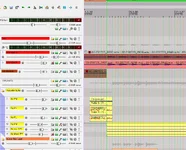
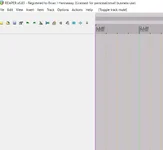
Background. I have partitioned my HD. Drive C contains Windows 11 (plus some of my FX). Drive D contains Windows 10 plus Reaper 6.83. I recently had to reload/reinstall W11 in drive C. Afterwards, when I opened Reaper (in drive D), the appearance of the newly opened Reaper looked like image 1. When I opened a project, I got the appearance in image 2. (This looks, to me, what a very early version of Reaper might have looked like??). Is it possible the re-installing of W11 in drive C could have affected Reaper in drive D. I subsequently downloaded a new version of Reaper 6.83. I did not uninstall the existing version. Should I uninstall the existing version and re-install v6.83 again. If so, will I lose the FX I have downloaded separately. Thanks.
 

Attachments

  • Newly opened Reaper 1.webp
    Newly opened Reaper 1.webp
    19.6 KB · Views: 6
  • Newly opened Reaper 2.webp
    Newly opened Reaper 2.webp
    100.7 KB · Views: 6
It look like you somehow have loaded a strange theme. Do you typically use the Default theme? You might try navigating to the ColorThemes folder in InstallData, and doubleclick on the Reaper 6 zip file. That should load the default 6 theme and may reset the icons.

If you have loaded a custom theme, you would have to reload that.

You shouldn't need to reload Reaper.
 
Thanks for your fast reply! I went to options/themes and note that the choices provided are very limited indeed, compared to what was on offer prior to this "change". I had done nothing to cause the changes as I had not opened Reaper for about 3 months. I cannot understand how the themes could have changed in the meantime and also why the themes on offer now have suddenly become so very limited. I have uninstalled and re-installed Reaper - no improvement. Very strange....... Perhaps I should simply start over and use Reaper, in a newer version, and put it in drive C under Windows 11. Brian
 
You can load themes that are posted on the Reaper site. I prefer that V5 look, so my V7 reaper looks the same as my V5. I didn't need to learn a bunch of new icons and paths. Fancy colors aren't necessary, except that I group things via color... drums, vocals, guitars.

I see no reason to start over, just reset the theme to what you want and carry on.
 
Many thanks. I am learning all the time, thanks to the excellent support I receive from the forum. Brian
 
It look like you somehow have loaded a strange theme. Do you typically use the Default theme? You might try navigating to the ColorThemes folder in InstallData, and doubleclick on the Reaper 6 zip file. That should load the default 6 theme and may reset the icons.

If you have loaded a custom theme, you would have to reload that.

You shouldn't need to reload Reaper.
If by "strange" theme, you mean "Classic_1.x", the best theme! :D

Anyway, by default, Reaper only ships with a few themes (5 by my count), but as Talisman pointed out, Briam, you can download others.

What I suspect happened with all your partitioning and OS reinstalls that your two Windows instances disagree on where your personal Reaper profile is stored. In windows, it defaults to USER/AppData/Roaming/REAPER, which is probably different between the two partitions. That is where your user-installed themes, effects chains, default settings, etc. all go
 
It's been so long since I looked at V1 theme that I didn't recognize it (the icons threw me). I started on V4 and looked at a few old themes, but never used them. Plus his screenshot didn't show any menu drop downs. Not knowing what his native theme SHOULD be, that would still be a "strange theme". :unsure:

It would have been more helpful to take a full screenshot rather than just a partial.
 
Thanks to everyone. Rather than continue to mess with this, I haver decided to simply download the latest Reaper to my C drive (under Windows 11). I have completed and mastered the album I made with Windows 10. As the album is for personal use only I will not be going back to modify it in any way. My next projects will use the latest Reaper in W11. Once again, very many thanks to everyone - I really do appreciate your support and comments. Brian
 
Brian, I'm confused. Are you unable to change the theme back in your current copu of Reaper?
 
I do not have a good answer for you, but I wonder…

A normal install of Reaper I think puts its “Resource” folder in the Windows users\roaming\whatever directory. Even if the main Reaper folder is on D, a whole of important stuff - including stuff to do with your preferences and custom settings - end up on whatever drive the OS calls home. If you formatted the C drive, that whole thing would be gone, and I’m not sure what kinda weirdness might follow from that. Pretty sure all the theme stuff is in there. I’d expect reinstalling Reaper would fix that, but who knows…

If you open the borked version, and go Options|Show resource path…. what happens?
 
First of all, I am no genius with computer technical stuff !! When I opened Reaper 6.83 in W10 in my D drive, then went to options/themes the only only choices presented were: Theme Adjustor/ Color Controls and Classic-1-1. Now when I open Reaper in W10 I get the latest v7 Reaper -seems like it will not open my Reaper 6.83. (By the way, I downloaded the v7 version to my C drive in recent days). Frankly, after all this, I am happy to continue with the v7 Reaper version. Brian
 
You can have different versions of Reaper, but you must have the EXE files in folders with different names, ie Reaper6 and Reaper7 otherwise the shortcut will go to the last "Reaper.exe" file installed.

I have both v5.99 and 7.57 on my system, but there are two different icons which point to different folders. I also renamed the V:5 file to Reaper5.exe, just to make it more apparent.

Something you will run into is that projects done in V7 may not load completely in V6, as they can have some options or capabilities in the newer version that are not yet in the prior version. However, all of my V5 projects load just fine in Reaper 7.
 
Back
Top