Why has my Reaper changed so dramatically

B

BriamJH

Active member
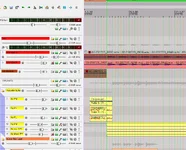
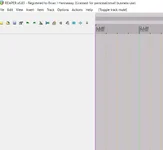
Background. I have partitioned my HD. Drive C contains Windows 11 (plus some of my FX). Drive D contains Windows 10 plus Reaper 6.83. I recently had to reload/reinstall W11 in drive C. Afterwards, when I opened Reaper (in drive D), the appearance of the newly opened Reaper looked like image 1. When I opened a project, I got the appearance in image 2. (This looks, to me, what a very early version of Reaper might have looked like??). Is it possible the re-installing of W11 in drive C could have affected Reaper in drive D. I subsequently downloaded a new version of Reaper 6.83. I did not uninstall the existing version. Should I uninstall the existing version and re-install v6.83 again. If so, will I lose the FX I have downloaded separately. Thanks.
 

Attachments

  • Newly opened Reaper 1.webp
    Newly opened Reaper 1.webp
    19.6 KB · Views: 3
  • Newly opened Reaper 2.webp
    Newly opened Reaper 2.webp
    100.7 KB · Views: 3
It look like you somehow have loaded a strange theme. Do you typically use the Default theme? You might try navigating to the ColorThemes folder in InstallData, and doubleclick on the Reaper 6 zip file. That should load the default 6 theme and may reset the icons.

If you have loaded a custom theme, you would have to reload that.

You shouldn't need to reload Reaper.
 
Thanks for your fast reply! I went to options/themes and note that the choices provided are very limited indeed, compared to what was on offer prior to this "change". I had done nothing to cause the changes as I had not opened Reaper for about 3 months. I cannot understand how the themes could have changed in the meantime and also why the themes on offer now have suddenly become so very limited. I have uninstalled and re-installed Reaper - no improvement. Very strange....... Perhaps I should simply start over and use Reaper, in a newer version, and put it in drive C under Windows 11. Brian
 
Back
Top