Recording guitar with an audio interface and PC

  • Thread starter Thread starter VladD
  • Start date Start date
V

VladD

New member
Hello! I am new here so please be patient with me :D. I have been searching like a crazy man for answers and I can't seem to find them. I really need help from someone to explain how to set volumes and gains properly for recording guitar. I have a Focusrite Scarlett 2i2 3rd generation, two Presonus Eris E5 studio monitors and a windows PC. From my understanding, the sound goes from the guitar to the audio interface (where I have a "gain" knob that can amplify the sound in analog), then to the DAW on my PC, then comes back to the audio interface and finally leaves the audio interface (where I have a "monitor" knob that just sets the output volume in digital) and goes to the studio monitors (which have their own "gain" knobs that can amplify the signal in analog). My biggest question is, how do I know where is the unity output on my Focusrite "monitor" knob. Is it at 100%, 50% or something else. I tried calibrating my studio monitors with a decibel meter from the listening position, but the problem is I set the "monitor" knob on my audio interface all the way to 100% thinking this is unity output, but I am not sure anymore. From my understanding I have to generate a pink noise on my DAW at -20Db, while my interface is at unity output. Then I calibrate each monitor so they output 80Db at the listening position. This seemed logical at first, but now, when I try to record my guitar, I have to keep the "gain" knobs on the inteface at the lowest and the sound is still to loud. I think this is because the 100% "monitor" knob is not unity output actually. I would be so greatfull if someone could help clear things up a little bit for me, because I am officialy lost :))). Please ask whatever additional information you need.
 
I believe unity on your interface is @ -6dB, which will be when the light on the gain knob turns amber. The knob will need to be set lower or higher to get that amber light (-6dB) depending on the instrument and how hard you play. Playing softly will require the gain knob to be set higher to reach that amber light. Playing harder, the knob sets lower.

This may be of some help (sift through the OP's lack of understanding) . There's also a description of how to set your monitor speakers using a signal from your DAW.

 
You should be using the monitor knob to adjust the listening volume, forget 'unity'. adjust the input gain as Spantini says above.
 
I've never had a need to calibrate anything? I pay attention to input levels and gain staging - but my monitor level knob is in a rack away from where I work, so I have no idea what it is set at. I know the link between the volume in the room at the mix position and the output meters of my DAW. I'm not one of these people who know exactly what their peaks and average levels are. The way my system is set up I have a software control of the studio volume that doesn't impact on the output meters, and if somebody comes in or my phone rings I use this to drop the level temporarily.

Surely you do your mix at the level you feel comfortable with volume wise? If you mix rock and loud forms of music, your monitors will be louder than if you are mixing spoken word or classical music. Monitor volume is a personal thing, and at many broadcast audio audio suites their monitor levels in speakers and headphones are rigidly controlled - far too low for me, but I understand their reasons. I don't know how many dBs I have at the mix position. To me it's irrelevant - it just needs to be 'right'. I find for many of my mixes where the volume controlling knobs are in their normal positions I'm always between 3 and 6dB of nominal - as in loading up an old mix of a similar track with similar dynamics and content.

Are you working to a prescription of some kind with your calibration? What exactly is your purpose and goal? Maybe you have two systems you want to be broadly the same? I have two studios in two different buildings and I just took a mix from the old studio and adjusted the new one's levels to be the same, measured by my ears, not a meter. If I play any track off the server in either one, I don't need to adjust a volume control, so I guess I've done sort of aural calibration of the interface so I don't feel any need to adjust anything, and I can make changes, then reload it in the other studio later with no ill effects?
 
The idea that monitors are calibrated to deliver around 80dB (C*) at the listening position for a pink noise signal at -20 or -18dBFS comes about I understand from 'professional' studio quarters? In a sound proof very well treated room and with top notch equipment 80dBC might well be on the mark but tis quite loud at home! To give 80dB some context? Even a good, $1000 say, FSTV will struggle to deliver 80dB at two mtrs. I would suggest you do calibrate to 80dB but then back off to a marked 70dBC SPL (for -20dBFS) Run at that lower level most of the time but crank to 80 dB now and again to check the balance.

The reasons for monitor calibration are several but perhaps the best one is 'constancy'? That is the fact that every time you come to the kit to mix or modify a recording you are always listening at a standard level regardless of YOUR state. You might have a cold (Cov 19!) be tired or over hung but a calibrated system will help you NOT to work "as yer guts guides yer!"

A good reference for an 'operating sound level' is speech. Ideally record someone and then reproduce that whilst flipping over to the live voice. The tendency is to always play things too loudly. If you don't have a willing subject record some speech from radio a good source is BBC Radio 3. The level of male speech is around 70-75dB at 300mm from a microphones.

*You ideally need a sound level meter with a C weighting.

Dave.
 
Remember I'm old - and have gone through the quest of trying to record on so many formats over the years and each decade seems to have prescriptions - they used to be in books but now the internet is full of advice, and navigating it is so hard. My favourite studio monitors I've ever had were Tannoys - dual concentric and I loved them. Lots of people hated them of course. I was once on a Soundcraft course. One of the other guys was Big Mick Hughes from Metallica, and he was having a hard time from some just out of college kids - who bombarded him with questions. One said how many dB do you have at the mix position? "No idea", he said, "I just turn it up till my teeth vibrate". I watched the kids taking this in. One then said, "What happens if you haven't enough subs to get it that loud?". His answer made me smile - "get more!"

I bet he knew exactly what the volume was on a meter, but he was trying to get over that it might be useful for legislation, rules or paperwork to know exactly the volume but your ears work pretty well. When we always had BIG speakers we also had the horrible little auratones and NS10s - but you couldn't align these to a common volume, so I always question any of these YouTube guidance things - alignment could be good, but align to what? There seem to be standards appearing, but could many be linked to the 14yr old in his bedroom who started it, or somebody who really knew what he was doing?
EDIT
That video just made me smile - some facts buried in comedy. He wants to get it accurate to half a dB? Really? even 2dB is hard to hear, but he's using a 6 dollar app, in his phone, with no thought as to it's accuracy. If the phone has anything other than flat response - which it won't have, then at best - you have the same volume on each speaker. What is the point of alignment here. He picked a volume level for your mixing for you, based on HIS needs and preferences. Totally pointless. If you were mixing classical music, and you were working on the second movement of a piece - it could be a quiet one ppp, and you need to balance the flutes against the piccolos or similar - you will find yourself reaching for the volume knob - how many of us have totally silent studios? Mine has the computers in the room next door, but one of my bits of rack mount kit has a fan that's noisy when volume levels are low. The next piece might have something majorly loud and I want to turn the volume down. So many rules are based on a persons typical music style. Who creates these daft rules?
 
Last edited:
Play a track mixed really well from your favourites - like the test music we always play at live sound gigs. Adjust the level and use a phone sound meter. When it's at a volume when you are comfy - not tiring or too loud, but not quiet so you hear the soft bits - those cymbal tings and stuff like that. That will give YOU your own personal baseline in dB. Then create your own mixes so they fit that measurement. After a quite short while, your ears will take over and you won't need the meter. You're thinking too much. Turn it up till you are happy - job done. It has nothing to do with being professional or amateur. They are your ears, and they have to last a long time. Take advice from YouTube people at your peril (or my advice, to be fair) - some people like it louder than others. 8 hours in a loud studio and your ears are less use. if it's too quiet, that too can be tiring. Just turn it up in the same way you do with listening to music or watching TV. Apart from laws in some jurisdictions (like the UK), you are free to pick.
 
The video was just about getting the left and right monitor speakers at equal output levels via the volume knob on them. I think the output db level he recommended was just to get the speakers running at the level you might be mixing at. Not sure how necessary that is for monitor output accuracy, but then you probably wouldn't want to try to get them equal at really low levels before the drivers visibly move either...

I don't see the monitor output level on the interface as being of any issue. It's just your output volume control. Now if you are using a monitor controller, then I suppose one should get those out/in/out levels correct. I calibrated my sub to my monitor levels using a similar procedure as the video shows.

BTW, my Mackie Big Knob shows 0bd input on its meter when my interface output is at 3 o-clock. That would doubtfully be the same for any different interface. If I didn't have that input meter on the monitor controller, I would just listen for the point of distortion, and pull back the interface output level til signal was clear.
 
Hi Rob you beat this slow old bugger. I do of course bow to your vastly greater experience. I have just related what I have read about and done with my own system. I think the concept of calibration came down to us from mastering engineers? I know naff all about that of course but my 'technical brain' tells me such a job would need systems that can be set to deliver the same results day in, day out?

The OP and of course most folks new to recording do not have your 'acoustic memory' of how things should sound and so it is natural I suppose for some of them to seek a 'standard'?

I have just listened to Land of Hope and Glory on my Tannoy 5As from about 2mtrs. I cranked it a bit but the music never went above 79dBC. That was more than loud enough for me and I suspect the lady next door! And I am clinically deaf!

Dave.
You are right, it was only for left right calibration. I will calibrate them but in a more intuitive way. I will get that "baseline" with a well mixed and mastered song as I was saying above and when I am at the baseline I will play a pink noise just to get the decibel level of each monitor. I will only use that to make sure they both output the same number without trying to bring them to a specific level. I think this will work for me.

I don't use a monitor controller so yeah...I think I should not worry so much about the monitor output. Only set it so I like the level while listening.

Yeah mine doesn't have a unity mark on it.
NOT trying to be awkward here but! Setting the same SPL from each speaker will not guarantee a perfectly centred image for YOU.

Few people have identical sensitivity in both ears and their ear's response can be very 'orf'!

By all means calibrate to a suitable SPL but then use a mono source with an identical dBFS level per channel and tweak the speaker controls to put the 'image' dead centre. (a good monitor controller has pre sets for this very job)

Dave.
 
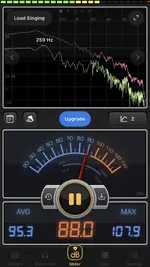
Dave - how weird we both like Tannoys. I had to downsize my studio in 2004 on a move and I sold (stupidly) my 15" Tannoys - a bad decision. I just sat on some steps here in the theatre A speaker very close and the phone app said the peak was somewhat loud! My ears told me that!
 

Attachments

  • Screenshot 2021-12-14 at 15.26.27.webp
    Screenshot 2021-12-14 at 15.26.27.webp
    359.3 KB · Views: 183
It's always over sensitive to bass - but to be fair, that's my phone I think.
 
Dave - how weird we both like Tannoys. I had to downsize my studio in 2004 on a move and I sold (stupidly) my 15" Tannoys - a bad decision. I just sat on some steps here in the theatre A speaker very close and the phone app said the peak was somewhat loud! My ears told me that!
I bought them blind Rob! I have never even heard a pair of Tannoy DCs! I made my choice from a magazine shootout where the reviewers could not see which speaker they were auditioning nor its price. The 5As consistently beat more expensive models. Then, I have know of "Tannoy" all my life and thought "They know a thing or three about 'sound', will go that way" Also, Tannoy really just made speakers and PA equipment, not every other electronic gimcrack on the market.

Re SPL meters on phones. I have the Keuwlsoft meter on mine. Gives a crude RTA as well. I have a 15 quid Maplin dBC meter and clibrated the Ksoft against that. One way to do this is to get to a 'silent ' place or at least where you cannot hear any noise. Callibrate the meter to 25dBC and you will be in the ball park.

Dave.
 
Back
Top