Noise Floor Problem - AKG P420 Microphone

M

michelp855

New member
Update: My problem has been solved! It looks like I had the base cut switch set incorrectly. I fixed that and my audio is now sounding how it did before. I also found that one of my shock mount bands was frayed pretty bad so I was able to catch that before it snaps. Thank you so much to everyone who responded to this post. I now have a better idea of what kinds of things to look for in the future if this comes up again. You may see more audio questions from me in the future!

Hello! My recording set up for voice over has started picking up a louder noise floor than usual. I set my gain at 12 o'clock and it used to be around -65 db and is now around - 55 db. I have not made any changes to my recording environment and don't think there are any external noises that would be different. I’ve done everything I can think of to fix it and nothing is working. In the past when this has happened I would just unplug all my cables and put them back in and it would resolve the issue. That is not working this time. I have also tried a new XLR cable and that did not help. I am not very knowledgeable in the sound department so apologies if I don't get terms quite right. Any thoughts or assistance you might have would be very much appreciated. I will list my gear, what steps I have taken to try and solve it, along with some audio samples.

Equipment:
  • AKG P420 Microphone
  • Rode XLR Cable
  • Focusrite Scarlett Solo Generation 4 interface
  • Hooked up to my Mac laptop using Adobe Audition
  • Rode NT1 microphone
Steps I’ve taken:
  • Unplugged and plugged back in all cables
  • Tried adjusting gain
  • Tried a new XLR cable
  • Tried a different DAW (Reaper)
  • Tried my old Rode microphone (noise floor around -60 db)
  • Put my mic in a ziploc bag with silica gel packets for 2 days to see if it was a moisture issue
  • Turned off all fans and heaters nearby

Since I have tried different cables and my old Rode NT1 doesn't seem to be picking up quite as much noise, I’m thinking it might be an issue with the AKG mic. I just bought it a year ago so I’m really hoping there is a way to fix this issue without needing to buy a new mic or return to my old one as I like how this one sounds.

Thank you in advance for any help you can provide!
 

Attachments

Last edited:
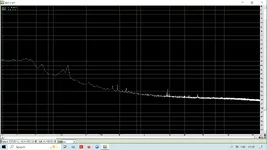
Have you looked at the spectrum of the noise? It's all 100Hz and under. There's a large peak at about 30Hz. Take the three files and normalize them all the same, then listen to the low frequency noise. It's very apparent. It also oscillates. I doubt that's coming from the mic.

Is the mic holder attached to a desk? That's where I would look first.
 
Have you flipped the bass cut switch? The bass cut is 12db/octave starting at 300Hz. If I put an EQ low shelf on the "current" file with that spec, it sound remarkably like the "pre issue" version.
 
Ive often wondered about making a "shoe box" sized coffin" to put mics into and partition out the room /electronic buzz with mic plugged in and powered up, for these type tests.

Seems Ive had noiser days at times too. But it can be tricky...had a ceiling fan downstairs/2 story that was On and it was what added a little noise floor increase..oddly. er...literally. Human ear couldn't hear it but the mic picked it up. Turned Off the ceiling fan and mic noise floor got a bit quieter like before. Its a regular thing now to make sure its off before running tech-noise tests. Sounds like youve already turned off the fans and heaters and noise makers.
 
Hi,
The level of his higher frequency hiss is about the same in your before/after comparison,
which makes me think it's probably not a gear issue,
but the bass content is different.
There's a noticeable bassy drone if your problem clip.

The same bassy drone exists in the rode clip but with much less hiss.

That makes me think the Rode is a lower self noise microphone (less hiss), but the bass noise is being picked up acoustically.


If I had to guess I'd say some noise-making device is on now that wasn't on before,
like a dryer, aircon, boiler, fan...something like that.
It could even be something smaller like a computer fan, depending how and where your mic is mounted.

Look for something in your property humming or droning just above a Bb.
 
There is significant hum at both 60 and 120Hz plus the rest of the spectrum is messy (much more so than my MOTU M4) and I suspect the noise is coming from a switch mode "wall rat" or inline PSU.

You might of course have a noisy USB source on the PC but that would surely show up on other things.

Two tests,
1) set controls for VO then unplug the mic from the interface and do a test recording. If that is clean,
2) Rig mic again on a long cable and take it into another room and wrap it in a duvet or thick blanket. Do another test recording and report back.

Dave.
 

Attachments

  • AKG noise.webp
    AKG noise.webp
    50.9 KB · Views: 7
Here are two spectral scans of all three files. You can see the low frequency noise is where the problem is. Your "current is upper left, Rode on the bottom. On the second scan, I put a low shelf filter on, 80Hz, -30dB. You can now see that your noise floor is at least15-20dB better.

Unless you have a basso profundo voice, I doubt you have a lot going on down there.

Before Low Cut.webp

With LoCut.webp
 
Have you looked at the spectrum of the noise? It's all 100Hz and under. There's a large peak at about 30Hz. Take the three files and normalize them all the same, then listen to the low frequency noise. It's very apparent. It also oscillates. I doubt that's coming from the mic.

Is the mic holder attached to a desk? That's where I would look first.
I'm not sure I totally understand what the different frequencies mean so it's hard for me to do any investigating into that. I appreciate your information in that area! My mic is on a freestanding mic stand with a shock mount, so not attached to a desk. But my recording space is pretty small so everything is very close to each other. Are you thinking it may be a noise or vibration coming from something else in the area?
 
Have you flipped the bass cut switch? The bass cut is 12db/octave starting at 300Hz. If I put an EQ low shelf on the "current" file with that spec, it sound remarkably like the "pre issue" version.
Hmmm I will look at that. I think I had it turned on but not 100% positive.
 
Ive often wondered about making a "shoe box" sized coffin" to put mics into and partition out the room /electronic buzz with mic plugged in and powered up, for these type tests.

Seems Ive had noiser days at times too. But it can be tricky...had a ceiling fan downstairs/2 story that was On and it was what added a little noise floor increase..oddly. er...literally. Human ear couldn't hear it but the mic picked it up. Turned Off the ceiling fan and mic noise floor got a bit quieter like before. Its a regular thing now to make sure its off before running tech-noise tests. Sounds like youve already turned off the fans and heaters and noise makers.
I'll have to do some more investigating to see if I have a noise I'm not aware of. Thanks!
 
Hi,
The level of his higher frequency hiss is about the same in your before/after comparison,
which makes me think it's probably not a gear issue,
but the bass content is different.
There's a noticeable bassy drone if your problem clip.

The same bassy drone exists in the rode clip but with much less hiss.

That makes me think the Rode is a lower self noise microphone (less hiss), but the bass noise is being picked up acoustically.


If I had to guess I'd say some noise-making device is on now that wasn't on before,
like a dryer, aircon, boiler, fan...something like that.
It could even be something smaller like a computer fan, depending how and where your mic is mounted.

Look for something in your property humming or droning just above a Bb.
Thank you for your insight! I'll take a look at my space and see if there's anything I'm missing that could be making a noise.
 
Here are two spectral scans of all three files. You can see the low frequency noise is where the problem is. Your "current is upper left, Rode on the bottom. On the second scan, I put a low shelf filter on, 80Hz, -30dB. You can now see that your noise floor is at least15-20dB better.

Unless you have a basso profundo voice, I doubt you have a lot going on down there.

View attachment 151608
View attachment 151609
My only problem with editing after I record is I'm often required to submit completely raw files for voice over. But it seems like adding a low shelf filter might be helpful for my own personal editing. Thank you!
 
There is significant hum at both 60 and 120Hz plus the rest of the spectrum is messy (much more so than my MOTU M4) and I suspect the noise is coming from a switch mode "wall rat" or inline PSU.

You might of course have a noisy USB source on the PC but that would surely show up on other things.

Two tests,
1) set controls for VO then unplug the mic from the interface and do a test recording. If that is clean,
2) Rig mic again on a long cable and take it into another room and wrap it in a duvet or thick blanket. Do another test recording and report back.

Dave.
I'll have to give these tests a try later. Thank you!
 
Have you flipped the bass cut switch? The bass cut is 12db/octave starting at 300Hz. If I put an EQ low shelf on the "current" file with that spec, it sound remarkably like the "pre issue" version.
It seems like this was the problem! I switched it to the opposite side I had it on and it's now sound so much better. I must have had it on the wrong setting or bumped it by accident. Thank you so much!
 
It seems like this was the problem! I switched it to the opposite side I had it on and it's now sound so much better. I must have had it on the wrong setting or bumped it by accident. Thank you so much!
The noise is therefore acoustic, in the room. You might also have the mic in the peak of a "standing wave"? The wavelength of 120Hz is about 9 feet so moving the mic a 1/4 wave could put it in a null. Couple of feet or so. Also the benefit of a shock mount can be negated by a stiff mic cable which can transmit vibration. The BBC used to use short "tails of thin, limp XLR cables with a loose knot in them.

The rising response in the analyser plots is part a function of the way RTAs work and part because electronic noise (transistors) tends to be "1/f" noise i.e. rising with falling frequency.

And regards "must submit raw files"? If you record .wav (44.1kHz/48k 24 bits) and then EQ in your DAW and submit as .wav I don't see how they can ever know? But the top blokes here might have other ideas...Rob?

Dave.
 
It seems like this was the problem! I switched it to the opposite side I had it on and it's now sound so much better. I must have had it on the wrong setting or bumped it by accident. Thank you so much!

Nice catch by @TalismanRich
Overlooked the obvious there!
As Dave says, that proves it to be acoustic. You're hearing your drier or something. 😂
 
Back
Top