
How is your Master Width set in the DAW?

  • Thread starter Thread starter LazerBeakShiek
  • Start date Start date
LazerBeakShiek

LazerBeakShiek

It is a life preserver
Came across a parameter and am wondering what other people are using as a setting for width? I figure you have a right and a left. A sweep for right and left. What is width? And in my instance what is 0%?
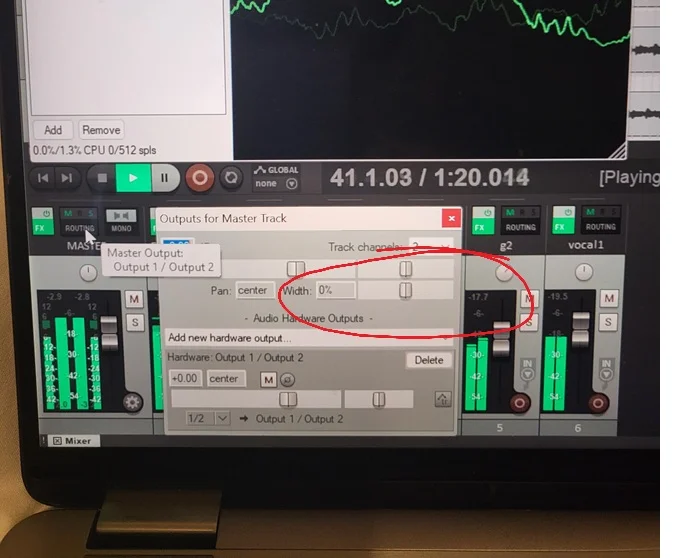
MasterWidth.webp

i read what it said in the reaper manual. Still?
 
I'm pretty sure the "width" setting is for any track that has two channels - and is for controlling the separation of the two channels. Unless, of course, I've misunderstood.

100% is for total left/right separation. 0% is a total collapse to mono - the two channels are right on top of each other in the middle. And I assume "-100%" flips the two channels so that "right" is now fully left - and "left" is fully to the right.

Can anyone else more knowledgeable confirm this?
 
I'm pretty sure the "width" setting is for any track that has two channels - and is for controlling the separation of the two channels. Unless, of course, I've misunderstood.

100% is for total left/right separation. 0% is a total collapse to mono - the two channels are right on top of each other in the middle. And I assume "-100%" flips the two channels so that "right" is now fully left - and "left" is fully to the right.

Can anyone else more knowledgeable confirm this?
I’m pretty sure that this is not the case, because if by default width is at 0% and sounds stereo, then it’s a 0% modification. -100% would be collapse to mono, and +100% would mean a total removal of mono signal.

As a REAPER user, I could double-check... but perhaps @LazerBeakShiek you should be able to just hear what’s going on? Kinda like 1176 attack/release controls (which are counter-intuitive) – if you have a pair of ears handy...
 
Porterhouse is correct. Having the width at 100% is normal L/R based on the pans of the channels coming into the master buss. Moving to 0% makes it a mono signal, and -100% swaps to R/L.

It's simple to test. Put in two different tracks, pan them hard left and right. Now go to the master and move the width control back and forth. You'll hear the signal move.

My default is 100% on the width control. The Pan setting tells you the setting of the pan control knob. If you have it set Left or Right of center it will show the %.

You can see it in this where I moved the Pan control left by over 50%. BTW, the two sliders above the pan and width controls are simply the level control and the pan knob settings. If you move the slider, you will see the control on the master move at the same time.

1790883844965.webp
 
Back
Top