HELP! My Tascam M-216 has a faulty VU meter needle. How do I locate and diagnose the cause?

  • Thread starter Thread starter JimmyTheDonutClerk
  • Start date Start date
JimmyTheDonutClerk

JimmyTheDonutClerk

Member
HELP! My Tascam M-216 has a faulty VU meter needle. How do i locate and diagnose the cause?Hello im in grave need of some help from a experienced tech wizardly advice on this one! To be specific, the problem we're trying to solve is my Tascam M-216 mixers vu meter needle (VU METER 1 dont react with movement when sending audio to it. The OL lamp gets a signal though and reacts and lights up when playing signals through pgm 1, that tells me that the signal is at least reaching the PCB so thats good.
The other vu meters (2,3 and 4) works perfectly fine and i can tell that the needle isnt stuck or sticky. Ive removed the meter PCB from the mixer and have them disconnected, i have the service manual with all the diagrams and so forth. but i don't know how im supposed to locate where the the fault lies on the PCB. I've ruled out that the the rot of the problem is on Meter 1/2 PCB, somewhere cause the peak lamp gets signal and meter 2 works fine. And if im correct i do believe that the signal splits of into the peak indicator and then to the meter coil right? so i think it's the R911 that isnt working. But im just making an assumption here.
So is there anyone who could help me locate the problem and solve it.
i have a multimeter, soldering iron and everything. but where should i begin? And what do yall believe the fault could be? should we do a continous test or a resistance test first and which diods should we start with? Do i need to de solder the vu meters thats blocking the side of the pcb that has all capacitors and so forth or could we find the problem on the solder joint side of the pcb?
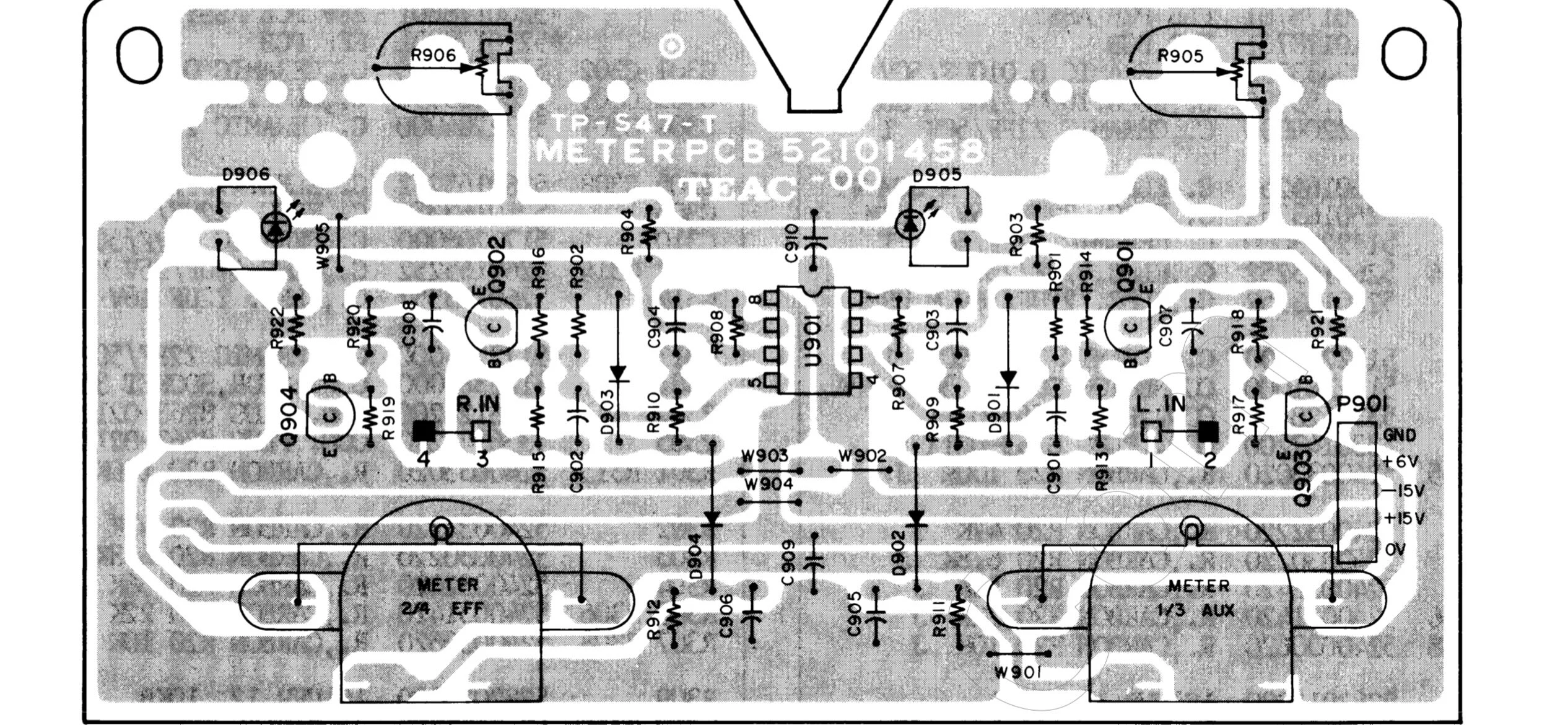
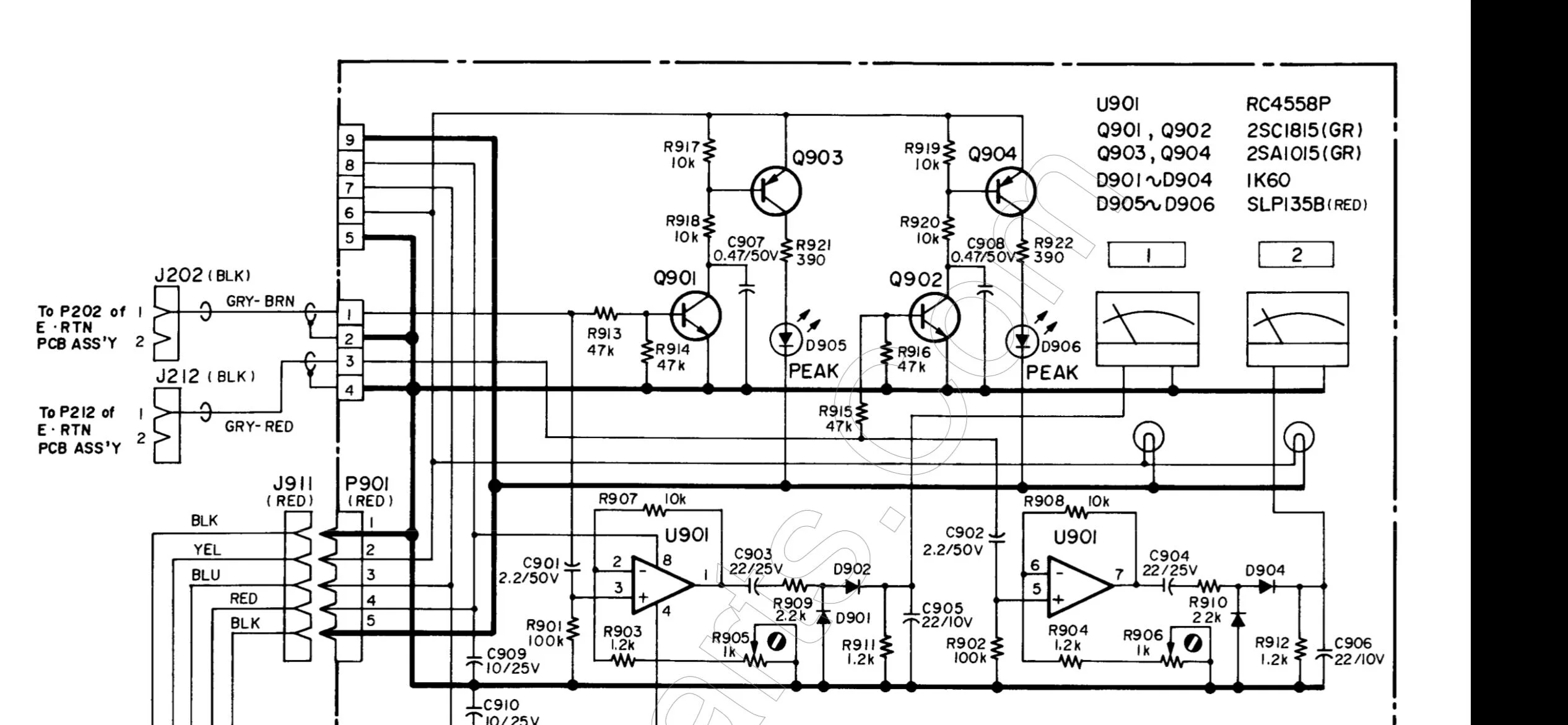
I've included the manual and pictures of the meter PCB in question, the one that ive removed from my m-216.

Tascam m-216 schematics and service manual
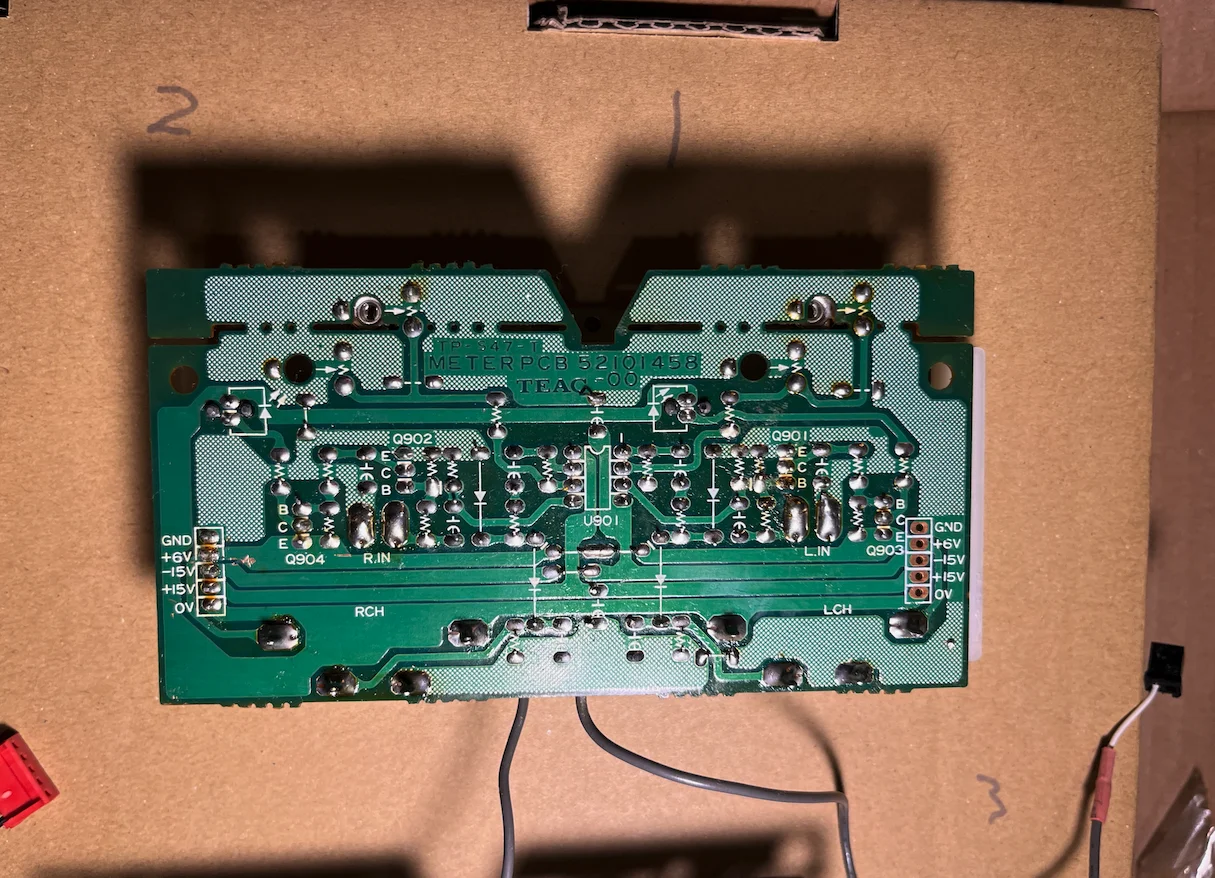
Skärmavbild 2026-10-03 kl. 05.48.15.webp
IMG_5888.webp
IMG_5823.webp
 
can you run sound through all the channels and everything is working except the VU meter?
If so it would lean towards the VU not the circuit.

I see in the drawings there's P202 and P212, can you swap those easily?
IF Ch 1 VU then works fine, it would be the circuit, if Ch1 VU still doesn't work it would be the VU meter not the circuit.

Another idea to think about is taking a reading off Pin 1 and Pin 7 off U901 see if there's activity mV with sound on or off.
That's what's feeding the VU Meter.

Im not a Tascam expert sooooo.....just ideas! good luck, too bad you couldn't just pop in another VU meter, it would answer the question possibly faster.
 
It's a faff, but with stuff like this, you can do lots of measurements with a meter. The two meter circuits being identical, you can meter left and right and compare. This will spot things like component failure. To really see wha is going on, you need audio running through the system. A simple mulitimeter is not that useful for this, as you need to see what is going through - tones are great, but you need an oscilloscope to actually see them and measure them as they pass towards the meter. Tascam use lots of plugs and sockets and ribbon cables. My ¼", before it blew up, had a meter fault and the cure was not on the meter card at all, but in the switches that changed what the meters were displaying. The meter was fine, but the audio going to it via the other switches had failed. Having the board out is easy for basic testing, but it needs to be back in the machine for circuit path checking.
 
It's a faff, but with stuff like this, you can do lots of measurements with a meter. The two meter circuits being identical, you can meter left and right and compare. This will spot things like component failure. To really see wha is going on, you need audio running through the system. A simple mulitimeter is not that useful for this, as you need to see what is going through - tones are great, but you need an oscilloscope to actually see them and measure them as they pass towards the meter. Tascam use lots of plugs and sockets and ribbon cables. My ¼", before it blew up, had a meter fault and the cure was not on the meter card at all, but in the switches that changed what the meters were displaying. The meter was fine, but the audio going to it via the other switches had failed. Having the board out is easy for basic testing, but it needs to be back in the machine for circuit path checking.

okay! But im pretty sure that it’s something on the meter card

I used my DMM to just measure the resistance of the R911 and R912 and they were completely diffrent on the 1 from the rest I think the other cards had a resistance value that differed quite much on the R911 and R912 components at the bottom and like they were double the value on the 1 from the rest (2,3 and 4 meter I think the other cards had a reading of 600 k Ω and the R911 resistor on the faulty meter had a reading of 1200 k Ω
 
R911 should measure the same as R912 per the schematic. 1.2K on your meter.

1200 is 1.2K, that's what the schematic says it should measure, per the drawing above.

Different values, It could be a good clue if your other identical boards are reading different values.
 
Interesting. The signal comes in splits and feeds two circuits. The Overload circuit and the Opamp circuit.
You say the Overload is working so that eliminates that circuit.

the same signal comes in to U901 for Meter 1. Pin 3 Input. Pin 1 Output.
D902 and R911 and Capacitor C905 on the output of the chip, to the VU Meter 1.

I still wonder if you cant just swap the connectors? J202 and J212,,,,,for a test. This would show you if the problem follows the circuit or the VU meter itself..

Meter 1 output is Pin 1 of U901 chip.
Meter 2 output is Pin 7 of U901 chip.

If you get a open near R911 it is acting same as if you unsoldered 1 leg, then you get exact resistance reading of resistor.
The others could be measuring different values because the Resistors are "in circuit" readings that don't have an open.

Also if the Meter shows an open, then that might also simulate having one side of the resistor free of the circuit.

Seems you are ok on Pin 3 of the chip because its the same signal that feeds the Overload circuit.
Can you check Diodes, D902 and D904 and see if they measure identical?

1791040337617.webp
 
Last edited:
can you run sound through all the channels and everything is working except the VU meter?
If so it would lean towards the VU not the circuit.

I see in the drawings there's P202 and P212, can you swap those easily?
IF Ch 1 VU then works fine, it would be the circuit, if Ch1 VU still doesn't work it would be the VU meter not the circuit.

Another idea to think about is taking a reading off Pin 1 and Pin 7 off U901 see if there's activity mV with sound on or off.
That's what's feeding the VU Meter.

Im not a Tascam expert sooooo.....just ideas! good luck, too bad you couldn't just pop in another VU meter, it would answer the question possibl

Yo cool cat, could I get your WhatsApp or email or something seems like you are the tech wiz I’ve been looking for, lol
Was thinking if I could maybe call you and just get some real time video guidance cause I’m way over my head with this really!

I’d be down to maybe compensate you in some worth of way?
 
you are in trouble if you think Im much help.

You're doing fine. You have the meter/PCB out.
Because you know Meter 2 is working fulling...it says all the Supplys are good because they are shared.

If you figure a way to swap the signal inputs...then if Meter 1 works then you know its electronics for Meter 1.
If the Meter 2 works fine with the wires swapped you'll know its the Meter 1- VU....coil or something is open in VU meter...
Wire 1 feed Meter 1 circuit
Wire 3 feeds Meter 2 circuit

Can you swap the connecters ? J202 and J212?


1791070287107.webp


Im guessing the wire in your picture is one of the connectors...
can you swap these two when you plug it back in?

1791070430094.webp
 
you are in trouble if you think Im much help.

You're doing fine. You have the meter/PCB out.
Because you know Meter 2 is working fulling...it says all the Supplys are good because they are shared.

If you figure a way to swap the signal inputs...then if Meter 1 works then you know its electronics for Meter 1.
If the Meter 2 works fine with the wires swapped you'll know its the Meter 1- VU....coil or something is open in VU meter...
Wire 1 feed Meter 1 circuit
Wire 3 feeds Meter 2 circuit

Can you swap the connecters ? J202 and J212?


View attachment 153493

Im guessing the wire in your picture is one of the connectors...
can you swap these two when you plug it back in?

View attachment 153494
this i can do! imma swap em and see if it does anything!!
also how do i measure a capacitor correctly and also the u901? like im so scared ill short and ruin a component haha
 
You need a capacitor tester - your meter is fine for resistance. However - capacitor failures are often visually obvious - swelled up, or sort of crusty substances on the leads - or even cracks sometimes. Their value changes with time but isn't usually a lot. Swapping the inputs will be a useful test to do and show you if the driver is fine, but no input or input but no meter. You could also try temporarily linking the two input channels - this should create the same reading on both meters. If it does not, you know the fault is on the board.
 
is it really necessary to get component or capacitor tester? Won’t I manage with just the multi meter to rear of a comment is faulty or not?
 
this i can do! imma swap em and see if it does anything!!
also how do i measure a capacitor correctly and also the u901? like im so scared ill short and ruin a component haha
you very well could ruin something.

and is why I say "Im not a expert" ....disclaimer....Im a home tech hack and will say "what I would do" doesn't mean it wont short something. haha

swapping cables to identical sockets is "something I would do".......knowing I might have two channels that don't work later.

but chances are, often, for a quick test a quick swap...its the identical circuit so....a partitioning test.

now if I was gambler....Id bet on the VU being bad first, because its mechanical, and they just go bad....like on ART MPA and VLA
 
okay i've done it now guys! i swapped j202 with j212 and as you said when turning to PGM 1 the meter 2 is moving. and meter 1 is still unresponsive...so that means its the vu meter coil that's broken? its nothing on the pcb..right?

IMG_5904.webp
 
you very well could ruin something.

and is why I say "Im not a expert" ....disclaimer....Im a home tech hack and will say "what I would do" doesn't mean it wont short something. haha

swapping cables to identical sockets is "something I would do".......knowing I might have two channels that don't work later.

but chances are, often, for a quick test a quick swap...its the identical circuit so....a partitioning test.

now if I was gambler....Id bet on the VU being bad first, because its mechanical, and they just go bad....like on ART MPA and VLA
as you said it should be the meter then? right? like i did the swap as you said and while panig the channel im playing sound on to PGM 1. the sound is playing on meter 2. and its working but when turning to pgm 2 that should make the meter 1 needle move isnt responsive as before. so it should be hte meter coil then right?
 
okay i've done it now guys! i swapped j202 with j212 and as you said when turning to PGM 1 the meter 2 is moving. and meter 1 is still unresponsive...so that means its the vu meter coil that's broken? its nothing on the pcb..right?
j202 and j212 are the inputs to the meter PCB.

Swapping them doesn't really prove anything, unfortunately, because you already knew the peak LEDs were responsive and, therefore, audio signal was getting to that PCB on both channels.

You swapped them and the fault didn't move (the same physical meter didn't work)
so you've proven the fault to the meter board, which includes the meters.
It could still be either.

Do both needles move freely if you gently sway the unit back and forth in your hand?
 
I used my DMM to just measure the resistance of the R911 and R912
Assuming you measured in circuit, you measured across the meters.
R911 + R912 are parallel to their meters.

Had you been in diode mode you'd have seen the meter move, confirming its working state.

If you do it again you might want to go through a 10k pot or something, starting at 10k in series and gradually reducing it
just in case your DMM is capable of overloading the meters.

If the ch1 needle does not move but others do with the same test, try to confirm it isn't physically jammed by shaking it about (gently).

If it's not physically jammed but the DMM isn't making it ping then I'd remove it from the pcb and confirm in isolation.

I think the other cards had a reading of 600 k Ω and the R911 resistor on the faulty meter had a reading of 1200 k Ω

This strongly suggests the meter has failed open as resistances decrease in parallel.
Reading 1200r across R911 (which is its value) points to there being nothing in parallel with it (the meter failed open)
and also suggests a healthy meter should have a value of 600ohms.
I'd want to prove all that, but that's how it sounds to me.

*I'm making the leap that you meant 1200ohm/1.2k, not 1200k.
 
Last edited:
j202 and j212 are the inputs to the meter PCB.

Swapping them doesn't really prove anything, unfortunately, because you already knew the peak LEDs were responsive and, therefore, audio signal was getting to that PCB on both channels.

You swapped them and the fault didn't move (the same physical meter didn't work)
so you've proven the fault to the meter board, which includes the meters.
It could still be either.

Do both needles move freely if you gently sway the unit back and forth in your hand?
Damn haha but yes they do they all sway when moved!
 
j202 and j212 are the inputs to the meter PCB.

Swapping them doesn't really prove anything, unfortunately, because you already knew the peak LEDs were responsive and, therefore, audio signal was getting to that PCB on both channels.

You swapped them and the fault didn't move (the same physical meter didn't work)
so you've proven the fault to the meter board, which includes the meters.
It could still be either.

Do both needles move freely if you gently sway the unit back and forth in your hand?
Also I measured the resistance or the Ohm I guess on the meters (connecting points to the pcb) I measured the lights(Top 2 pins) and they were all the same which read 07,7Ω but when I measured the bottom pins which should be the connector to the vu meter it read like this
Bottom Pins
Meter 1 = 1,182 kΩ

Meter 2 = 0,596 kΩ

Meter 3 = 0,596 kΩ

Meter 4 = 0,596 kΩ

Does that illuminate anything or am I just going round in circles?
 
hello everybody while going into diode mode and touching the meter connectors t(the bottom pins on meter board 1 and 2) i went R911/R912 (meter 2 jumped and was shaking its tail feather. meter 1 unresponsive.

but just to be sure i went closer in the circuit to the meter itself and touched the connecting bottom pins that connects it to the pcb.
once again number 2 shaking it. number 1 dead.
i guess to finnaly conclude if its the connection to the board and just need a resoldering or if its the wires inside is only possible if i open it up and do a test direct on the meter right?
 
Back
Top