

You are using an out of date browser. It may not display this or other websites correctly.
You should upgrade or use an alternative browser.
You should upgrade or use an alternative browser.
R
RFR
Well-known member
That was pretty cool actually. Your vocals In particular impressed me.
Here’s some observations as an outside listener.
1) guitars sound a bit more distorted than the should.
2) time is weird. Are the drums to the grid? I dunno exactly what I’m hearing but it sounds like something is in perfect time while other elements are in and out of time.
From everything I’ve heard and read, zeppelin stuff was not righteously locked to time, but the whole band flowed in and out of time.
3) levels can be a bit off at times too.
Overall, well done, you took on something I wouldn’t be willing to touch.
You did a good job and have completed what id call a good rough mix. Maybe take a day or two or three off and come back with fresh ears.
Here’s some observations as an outside listener.
1) guitars sound a bit more distorted than the should.
2) time is weird. Are the drums to the grid? I dunno exactly what I’m hearing but it sounds like something is in perfect time while other elements are in and out of time.
From everything I’ve heard and read, zeppelin stuff was not righteously locked to time, but the whole band flowed in and out of time.
3) levels can be a bit off at times too.
Overall, well done, you took on something I wouldn’t be willing to touch.
You did a good job and have completed what id call a good rough mix. Maybe take a day or two or three off and come back with fresh ears.
Eric V
Member at-large
Yeah, I knew it wasn't perfect but I had put a lot of time into it between doing all the tracks and mixing. I usually will let a song in that situation sit for a few days then clean it up more. I did snap the tracks to the grid, but maybe I need to adjust the snap value a bit more. And adjust levels. Thanks RFR.That was pretty cool actually. Your vocals In particular impressed me.
Here’s some observations as an outside listener.
1) guitars sound a bit more distorted than the should.
2) time is weird. Are the drums to the grid? I dunno exactly what I’m hearing but it sounds like something is in perfect time while other elements are in and out of time.
From everything I’ve heard and read, zeppelin stuff was not righteously locked to time, but the whole band flowed in and out of time.
3) levels can be a bit off at times too.
Overall, well done, you took on something I wouldn’t be willing to touch.
You did a good job and have completed what id call a good rough mix. Maybe take a day or two or three off and come back with fresh ears.
Eric V
Member at-large
R
RFR
Well-known member
Much better.
Like I said earlier, it’s a tune I wouldn’t tackle. My hat’s off to you for even attempting to do it.
You done good.
Like I said earlier, it’s a tune I wouldn’t tackle. My hat’s off to you for even attempting to do it.
You done good.

stratmonkee
Well-known member
Wow , nice job on an ambitious song to cover, vocals and guitar great performance, as well as keyboards, how did you get the strings /mellotron sound? Sounds great! Fine job!
Eric V
Member at-large
Thanks! I used a strings patch on my keyboard. I'm still looking for a better Mellotron plugin but haven't found any great ones for that yet.Wow , nice job on an ambitious song to cover, vocals and guitar great performance, as well as keyboards, how did you get the strings /mellotron sound? Sounds great! Fine job!
O
OSHC
Active member
Very nice performance. Enjoyed it very much!Here it is, I've slaved over it long enough. By the time I present a song here I'm kinda burnt out.I did all the parts, soup to nuts.

PorterhouseMusic
Well-known member
Excellent! You did this justice. <--- not easy to do, I know. Finally had a chance to hear this properly on good playbacks - sounds good.  Enjoyed that all the way through. Way to go with keeping to the spirit of the original.
What electric gtr is in the right channel? Les Paul?
Enjoyed that all the way through. Way to go with keeping to the spirit of the original.What electric gtr is in the right channel? Les Paul?
Eric V
Member at-large
Thank you very much. The guitar on the right is actually my Music Man Sterling 7-string, but I didn't play the 7th string in this at all. I still had to tune it such that the tension remained even across the strings which wasn't easy at all. It was all I had available for electrics at the moment. Thanks for the listen and nice comments.Excellent! You did this justice. <--- not easy to do, I know. Finally had a chance to hear this properly on good playbacks - sounds good.
What electric gtr is in the right channel? Les Paul?

Papanate
Well-known member
It doesn't sound like you used an acoustic on the left side? Is the MM again?Thank you very much. The guitar on the right is actually my Music Man Sterling 7-string, but I didn't play the 7th string in this at all. I still had to tune it such that the tension remained even across the strings which wasn't easy at all. It was all I had available for electrics at the moment. Thanks for the listen and nice comments.
Eric V
Member at-large
@Papanate It is an acoustic -a Guild. What is MM? Here is the song with just acoustic and vocals. Maybe it will sound more like what it is?It doesn't sound like you used an acoustic on the left side? Is the MM again?
Attachments
Papanate
Well-known member
MM = Music Man. Interresting - I think you should bring up the Guild in the recording and pan it less to the left .@Papanate It is an acoustic -a Guild. What is MM? Here is the song with just acoustic and vocals. Maybe it will sound more like what it is?
Eric V
Member at-large
Ok, sounds like good ideas to me, thanks. In order to raise the volume on the Guild, I will likely have to re-record it as the volume is maxed on that track. I think I didn't put the input level hot enough for recording. And I see about the Music Man. Yeah that's my main axe but what you heard is definitely the Guild. Thanks again @Papanate .MM = Music Man. Interresting - I think you should bring up the Guild in the recording and pan it less to the left .
Papanate
Well-known member
What is your DAW?Ok, sounds like good ideas to me, thanks. In order to raise the volume on the Guild, I will likely have to re-record it as the volume is maxed on that track. I think I didn't put the input level hot enough for recording. And I see about the Music Man. Yeah that's my main axe but what you heard is definitely the Guild. Thanks again @Papanate .
Eric V
Member at-large
Reaper 7.81What is your DAW?

TalismanRich
Well-known member
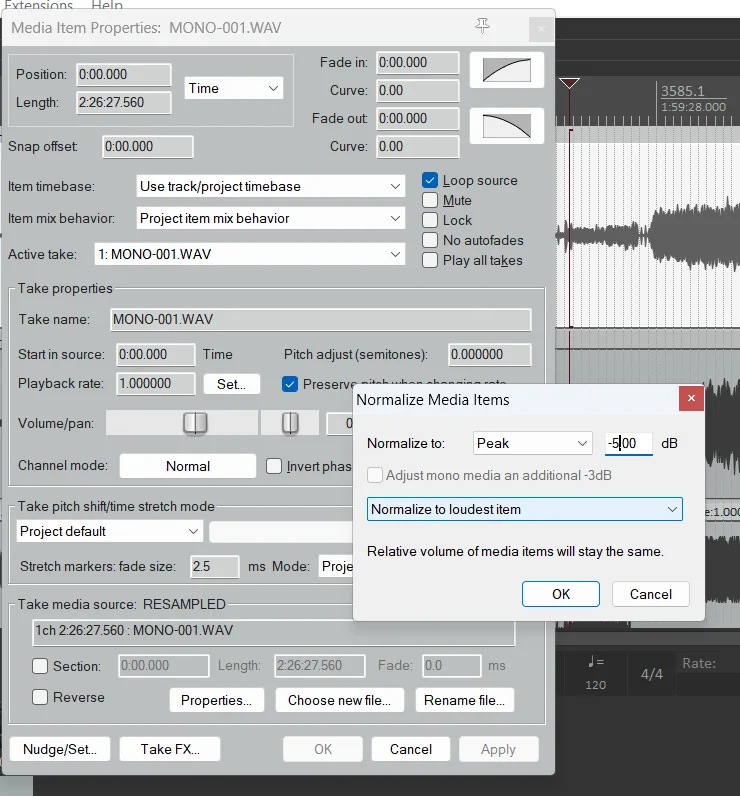
Eric, you shouldn't need to rerecord the track to get it louder. You can take the acoustic track and normalize it to something like -5dB and have all the gain you need. Just right click on the track, choose Item Properties at the top, In the middle is Normalize. It will open a dialogue box and let you choose how high you want the largest peak. Make it -5 or -10. It will tell you how much gain it is adding.
Eric V
Member at-large
Thanks so much Rich!Eric, you shouldn't need to rerecord the track to get it louder. You can take the acoustic track and normalize it to something like -5dB and have all the gain you need. Just right click on the track, choose Item Properties at the top, In the middle is Normalize. It will open a dialogue box and let you choose how high you want the largest peak. Make it -5 or -10. It will tell you how much gain it is adding.
View attachment 153532
Eric V
Member at-large
F
frank1985
Active member
That's not an easy cover....you did a great job
Similar threads

- Replies
- 10
- Views
- 2K

G
- Replies
- 8
- Views
- 1K
G
