Any Yamaha AW2400 owners out there?

altruistica

altruistica

Member
Hi,
Long, long time since I've been here.
Much to tell, little time to do it.
Anyhow, I'm trying to tie up all my historical projects and finding gaping gaps in my usually fastidious backups / transfer regime. I have a few Yamaha.aws files that I never extracted the wav files from. The only way seems to be with an actual unit (AW2400). I don't really want to have to buy a secondhand unit just to do this. Could someone who has the machine download the .aws files from say a dropbox or similar and transfer them to 24bit wav files and then upload them again?
Thanks,
Al
 
I've got an AW1600. I don't know if it will handle the file if you have more than 16 tracks. Are you looking for finished tracks with effects, or just the raw data?

You can try AWEXTRACT. It will pull the raw WAV files out, but you won't get any effects that you used in a mix. It's an old program but still runs under Win 10 and 11. It's available on Softpedia for download.

There is another newer program called AWMiner Gold. There is both a free and paid version. The author is Ben E Badman who moderates the AW4416 group on Facebook.

 
Hi Talisman Rich,
Thanks for the reply. The AW Extract and AWMiner are both for AW1600 and or AW16G. Because the AW2400 had a USB2.0 port for precisely this operation (converting /extracting WAVs, there doesn't seem to be any third party software to do this.
 
AWExtract will work with the AWS files from the 2400, and 4416 and 2816. The 1600 and 2400 use the same system, and all 5 store audio in the same format. The 1600 also has USB. The AW16G doesn't.

If you have backup files from the 2400, you should be able to extract the audio and save as WAVs with AWE from the hard drive.
 
I can't seem to get AW Extract to work with .aws files. When you open the program and search for the file/ folder using OPEN, the file tab in the dialog box is expecting a *.cfs or *.16G file. There is no mention there of .aws. See my Youtube vid here:

 
Also, I couldn't get it to run under Win 11 HOME using different compatibility versions from Win 98 to Win 8. I could run it on a Win 8.1 machine as senn in the video.
 
AWExtrack works on songs saved on a CDR, and I think only in whats called AW2816 mode. Backing up via USB is simply a copy function of the folders, so there's no special backup info.

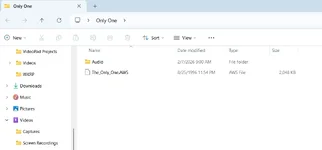
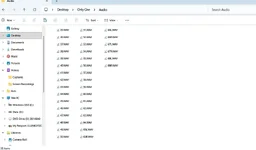
There should be audio files in the Audio folder of those backups. Here is what I see from the demo song of the AW1600. The 2400 should be the same. As I understand, the AWS file holds the makers to place the various audio files at the proper time and with all attributes (fader positions, effects settings, etc.). If the recording was done as a straight real time audio, you could be able to align them in a DAW. If they were done with punchins, etc you would need to move them to align them to the proper points.

If your audio folders are empty, I guess there's no data there.

Demo song.webp
AW Audios.webp

PS. I run AWE in XP ServicePack2 compatibility mode on Win 11 Home.
 
Last edited:

Similar threads

Back
Top