glaciersofice
New member
Does anyone know if it's possible to export .wav files to a computer via zip disc? Thanks in advance.
Last edited:



Thank you thank you thank you!!! That is AWESOME!!! Why couldn't someone have come up with this years ago! You wouldn't believe the incredible hassles me and many others have gone through to copy those files with spdif to a computer. You are GOD!!!Try this...
http://www.thegoodlibrary.com/VSWaveExport.html
Works great with my VS2480 and from what i see in the docs, has been tested on 880's as well.
Good luck

Thank you thank you thank you!!! That is AWESOME!!! Why couldn't someone have come up with this years ago! You wouldn't believe the incredible hassles me and many others have gone through to copy those files with spdif to a computer. You are GOD!!!

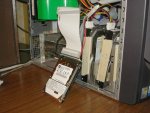
Disregard my photo. I had an ide cable adapter laying around which is what's in the photo, but I also did it with an external case with a usb connector.Ok this is stellar...
but. Is there any kind of connection cable, that will allow me to connect the harddrive to my laptop?
This would be an absolute god send!!!!!!!!!!!!!!!!!!!!
i got this link from another user a while ago but i was lost in the words. and havent gone back to it. Now that i see it in dumbed down terms i am STOKED!!!!
Suggestions????? please.
this has been a thorn in my side for EVER!!!!
 Similar to this:
Yes.so what would i do? just buy the case, then put the VS harddrive into that and then connect it via usb and follow the directions on that link up there?
How do i know what kind of case to get?
The program also works with backups of your VS data (assuming that you ARE backing up your projects to CD/DVD)...
Just put the CD/DVD with your backed up project(s) into your computer's CD/DVD drive and select 'Rip from CDR' in the menu...
That opens a window where you insure that the drive letter matches your CD/DVD drive and the destination of the Ripped files.
After the ripper runs, all the tracks show up in the Wave Export program... Works REAL slick!
Wave files are in the computer and you have a good reason to back-up your projects regularly.

I know what you mean. I quit using my VS machine because it's such a hassle to get the files into a compluter. Now I'm thinking about buying another later model.i havent found a compatible burner for my Vs
Also thanks corvette. i may give this a try this wekeend. If it works. I am going ot be SOOOOOOOOOOOOOOOOOOOO
effin pumped.

Thanks so much guys! But would it be possible to transfer the files through the zip discs? It'd be less of hassle than using CDs (at least I think so)

Why one track at a time?I downloaded the updated drivers for my maudio sound device and it has ASIO drivers included,
i was able to to successfully play the roland tracks and record them to my daw effortlessly....
NO drop outs no nothing.
Mind you it went one track at a time but the fact is it did it with out a hitch. well one. There was an odd sonor ping like blip half way thru one track in the playback but it didnt effect the syncronization of the tracks...
Exciting. after 3 years of tinkering (and not spending a fortune on new gear) i got it.
I was a very happy guy last nigh.
 I'm glad I grabbed that program while it was available.